
Macro evaluator#
Overview#
Automate provides a macro evaluator for testing macros at a hierarchy level.
Note
The macro evaluator is by default not available to the sysadmin administrator.
Refer to the macro functions, syntax and examples in the documentation.
On the Macro Evaluator page you can evaluate a macro, and also:
Click the Reset button to revert the form to the default example.
Click the JSON Edit button to edit your macro and context in a JSON editor.
Use the Copy to Clipboard button to copy the macro output.
Use the Save to File button to save the macro output to a JSON file - default filename is
Macro_Output.json.
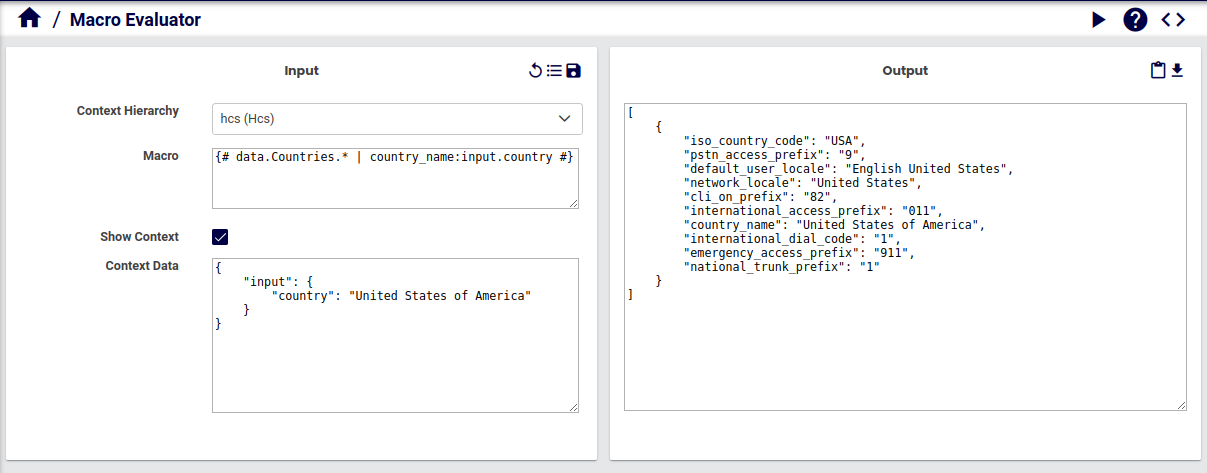
Evaluate a macro#
In the Admin Portal, go to Macro Evaluator.
From the drop-down list, choose the Context Hierarchy at which the macro is to be evaluated.
Enter the macro text in the Macro input box.
By default, a macro
{# data.Countries.* | country_name:input.country #}is entered as a test macro to evaluate and Show Context is enabled to display the Context Data box for theinput.parameter in the macro. Refer to the examples in the macro reference topics.Enable and provide values for Context Data and add data if required.
Click Evaluate to run the query. The result of the evaluated macro is displayed in the Output box.