
AWS Deployment#
Overview#
VOSS Automate can be deployed onto the Amazon Web Services (AWS) cloud using private Amazon Machine Image (AMI). Two private AMIs are provided - one for deploying the application node, and the other for deploying the database node. Both AMIs are built as appliances that contain a self-contained operating system, and the required application or database.
Before you Start
The customer should supply the following to enable VOSS to create a private AMI:
AWS Account ID
Deployment Country
Deployment Region
Hardware Requirements#
Note
The AMI’s storage is pre-configured as per below specifications. Max EBS IOPS and Throughput is dependent on the Instance Type, increase if required.
Example:
r6a.xlarge
- Max Throughput (MB/s) = 1250.0
- Max I/O Operations/second (IOPS) = 40000
Application Nodes:
Instance Type: r6a.xlarge or equivalent
Instance CPU Architecture: x86_64
CPU: 4
RAM: 32
OS Disk: 30 GB, GP3 @ 3000 IOPS / 125 throughput
Application Disk: 50 GB, GP3 @ 3000 IOPS / 125 throughput
Total Disk size: 80 GB
Database Nodes:
Instance Type: r6a.xlarge or equivalent
Instance CPU Architecture: x86_64
CPU: 4
RAM: 32
OS Disk: 30 GB, gp3 @ 3000 IOPS / 125 throughput
Application Disk: 50 GB, gp3 @ 3000 IOPS / 125 throughput
Backup Disk: 125 GB, sc1
DB Disk: 250 GB, io2 @ 750 IOPS
Insights Disk: 70 GB, io2 @ 750 IOPS
Total Disk size: 525 GB
Web Proxies:
Web Proxies are replaced by an Application Load Balancer
Network Communications External to the Cluster#
The following details are all based on the default settings. These can vary depending on the application setup and network design (such as NAT) of the solution, so may need adjustment accordingly. Where a dependent is noted, this is fully dependent on the configuration with no default.
These communications are all related to communications with devices external to the cluster.
Outbound Communications to Devices from the Application/Unified nodes:
Communication
Protocol
Port
Cisco Unified Communications Manager (CUCM)
HTTPS
TCP 8443
Cisco Unity Connection (CUXN)
HTTPS
TCP 443
Webex
HTTPS
TCP 443
LDAP directory
LDAP
TCP/UDP 389 and/or 636(TLS/SSL)
VOSS Automate Communications
The cluster contains multiple nodes which can be contained in separate secured networks. Network ports need to be opened on firewalls and/or network security groups to allow inter-node communication – these are described in more detail in the Platform Guide.
All communication between nodes are encrypted.
Communication
Protocol
Port
Database access
Database
TCP 27020 and 27030 bi-directional
Cluster Communications
HTTPS
TCP 8443
Remote Administration
SSH
TCP 22
Web Server Communication
HTTP/HTTPS
TCP 80/443
Simple Network Management Protocol
SNMP
UDP 161 and 162
Network Time Protocol
NTP
UDP 123
Domain Name System
DNS
UDP 53
VOSS Automate AWS Deployment Topology#
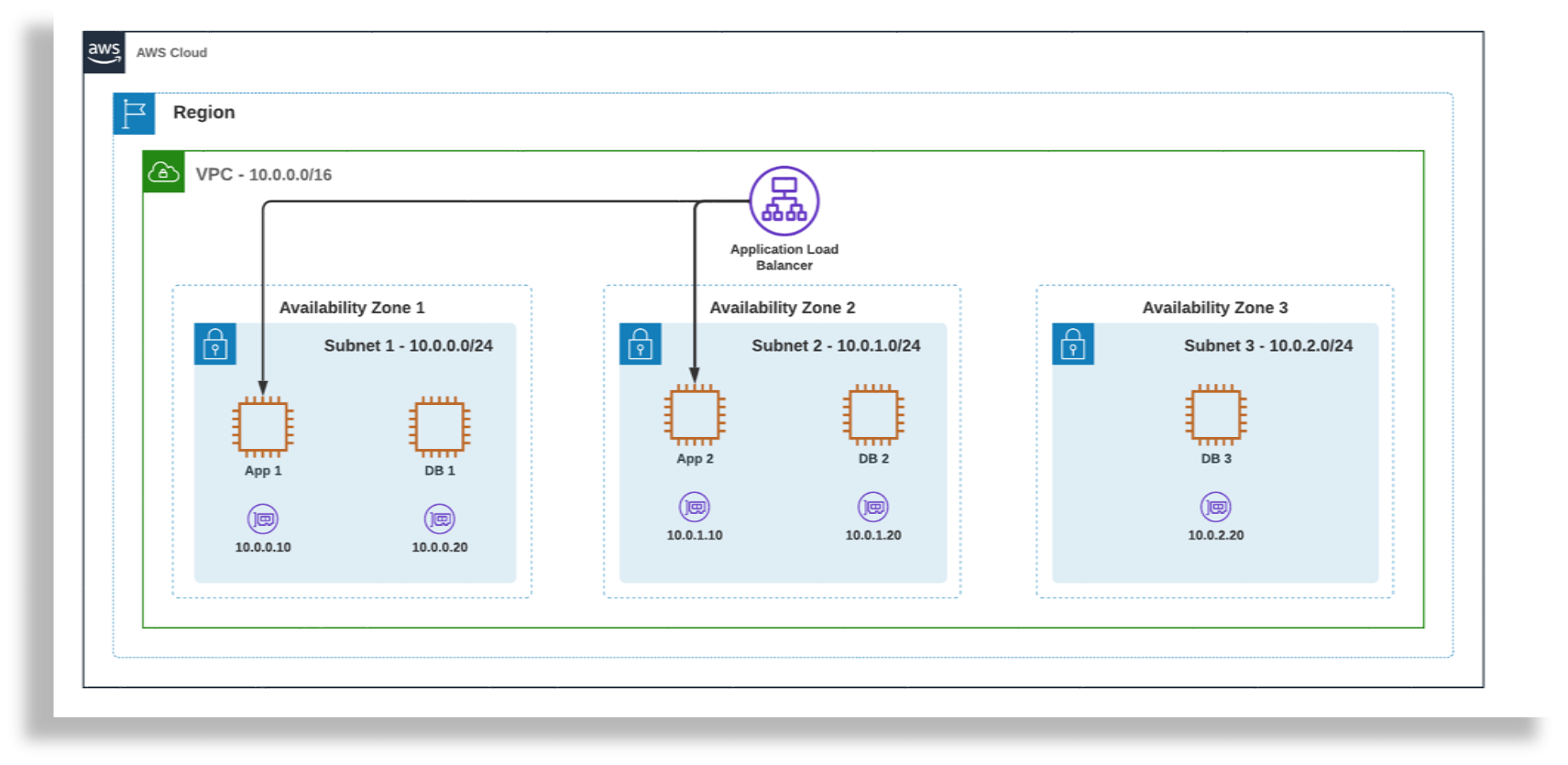
AWS Application Load Balancer Configuration#
Basic configuration
Scheme: Internal
IP address type: IPv4
Network mapping
VPC: The VPC where the VOSS Automate Application Nodes reside
Mappings: The Availability Zones where the VOSS Automate Application Nodes reside
Security groups
Create a new security group or select an existing one.
Target group
Basic configuration
Target type: Application Load Balancer
Protocol: TCP/443
VPC: The VPC where the VOSS Automate Application Nodes reside
Health checks
Health check protocol: 443
Health check path: /portal
Advanced health check settings
Health check port: Traffic port
Success codes: 200, 202
Listeners and routing
Protocol: HTTPS
Port: 443
Default Action: Forward to (above target group)
AWS Management Console Deployment Procedure#
Prerequisites
VPC with 3 subnets across 3 availability zones.
Login to your Account
Navigate to EC2 Services.
Click on AMIs under Images in the left pane.
Select the correct Region from the drop-down at the top right.
Select Private Images from the drop-down filter.
The VOSS Automate AMIs should appear in the list.
Select the VOSS Automate Application/Database AMI in the list, Launch Instance from AMI.
Configuration
Name: Give the instance a descriptive name e.g automate-app-node-1
Key pair (login): Proceed without a key pair. This is managed by VOSS Automate.
Instance Type: As per hardware requirements.
Network Settings: Configure the subnet based on the availability zone.
Example:
Subnet 1 - us-east-2a
Application Node 1
Database Node 1

Subnet 2 - us-east-2b
Application Node 2
Database Node 2

Subnet 3 - us-east-2c
Database Node 3
Configure storage: As per hardware requirements.
Terraform Deployment Procedure#
Terraform scripts have been provided as a starting point to deploy as per above topology diagram.
This will deploy the following:
VOSS Automate Modular Cluster
AWS Application Load Balancer
Bastion Server (For Automate Remote Administration Access)
VOSS Automate Platform Config and Template Install Procedure#
On each of the newly deployed node(s), log in as the platform user.
username: platform
password: platform

User will be prompted for a password change.
Enter the current password, new password and confirm the new password.
You are now ready to configure the platform and install the template.
Note
For both Azure and AWS, deploy using Automate 25.1 and later, the
security checkandsecurity updatecommands are not available, since security updates are included during the release upgrade process.