
Microsoft Defender for Endpoint security management and policies#
Microsoft
Overview#
Automate provides support for Microsoft Defender for Endpoint, that addresses user devices (laptops, phones, tablets, PCs) and network devices (access points, routers, firewalls).
Note
The following entry under Global settings, Enabled Services needs to be enabled: Enable Defender for Endpoint - see: Global settings.
For further setup and configuration, see: Microsoft Defender setup, sync and overbuild.
Dashboards#
The administrator interface provides dashboards for the view and management of data:
Dashboards:- Security Management - Defender for Endpoint Overview
- Security Management - Defender for Endpoint Actions
By default:
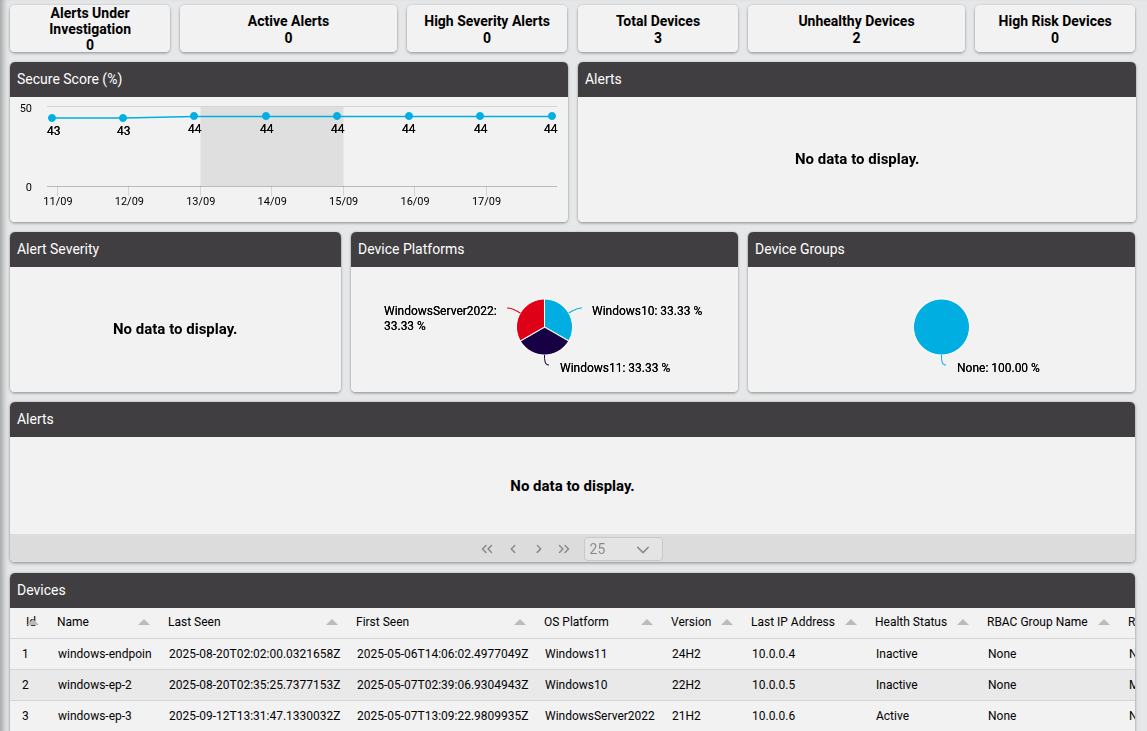
The Defender for Endpoint Overview dashboard provides the administrator with counters, charts and tables showing information on alerts and devices that are visible from the administrator’s hierarchy, for example the total number of alerts and status breakdowns by site, as well as an overview of device types and platforms.
The Defender for Endpoint Actions dashboard also provides the administrator with counters on alerts and devices, as well as quick links to view and manage incident, alert and device actions.
To customize your dashboards:
Resources have been added and are available to widgets on a dashboard where Data Source is Automate Analyzed.
For example:
Defender Actions, Shows Microsoft Defender actions,
device/mssecurity/MachineActionDefender Alerts,Shows Microsoft Defender alerts,
device/msgraphsecurity/AlertDefender Devices,Shows onboarded Microsoft Defender devices,
device/mssecurity/MachineDefender Exposure Score by Device Group,Shows Microsoft Defender exposure score by device group,
device/mssecurity/ExposureScoreByMachineGroupsDefender Incidents,Shows Microsoft Defender incidents,
device/msgraphsecurity/IncidentDefender Secure Score,Shows Microsoft Defender Secure Score,
device/msgraphsecurity/SecureScore
Incident and Alert Actions#
Incidents#
Related device model: device/msgraphsecurity/Incident
Automate provides an Incidents list view showing such headings as the incident Status and Severity at a hierarchy (Located At), and allows for the examination of the Details of an incident, including for example the Incident Web URL at security.microsoft.com.
Details example in JSON:
{
    "id": "5",
    "tenantId": "f372af60-59d5-4e03-a849-9e46a432aac0",
    "status": "redirected",
    "incidentWebUrl": "https://security.microsoft.com/incident2/5/overview?tid=...",
    "redirectIncidentId": "1",
    "displayName": "[Test Alert] Suspicious Powershell commandline",
    "createdDateTime": "2025-05-07T13:12:59.9233333Z",
    "lastUpdateDateTime": "2025-05-07T13:13:12.24Z",
    "classification": "unknown",
    "determination": "unknown",
    "severity": "informational",
    "customTags": [],
    "systemTags": [],
    "lastModifiedBy": "Microsoft 365 Defender-AlertCorrelation",
    "comments": []
}
Alerts#
Related device model: device/msgraphsecurity/Alerts
Automate provides an Alerts list view showing such headings as the incident Title, Status, Severity, Description and Device at a hierarchy (Located At), and allows for the Details of an instance to be viewed and managed.
Managing an alert
Administrators can manage the following alert properties:
Status
Classification
Determination
Assigned To
Details snippet in JSON:
"category": "Execution",
"status": "resolved",
"severity": "informational",
"classification": "falsePositive",
"determination": "malware",
"serviceSource": "microsoftDefenderForEndpoint",
"detectionSource": "microsoftDefenderForEndpoint",
"createdDateTime": "2025-05-06T14:13:19.0633333Z",
"lastUpdateDateTime": "2025-08-21T02:47:29.24Z",
"resolvedDateTime": "2025-08-21T02:47:29.17Z",
"firstActivityDateTime": "2025-05-06T14:06:51.7300174Z",
"lastActivityDateTime": "2025-05-06T21:45:13.6345713Z",
"deviceEvidence": {
...
},
"userEvidence": {
...
},
"productName": "Microsoft Defender for Endpoint",
"deviceDnsName": "windows-endpoint",
"deviceTags": [
...
],
"userAccountName": "defender-admin",
"userSid": "..."
Device Actions#
View Devices#
Related device model: device/mssecurity/Machine
Automate provides an View Devices list view showing such headings as the Last IP Address, Health Status, Exposure Level and Device at a hierarchy (Located At), and allows for the examination of the Details of a device.
Bulk Actions#
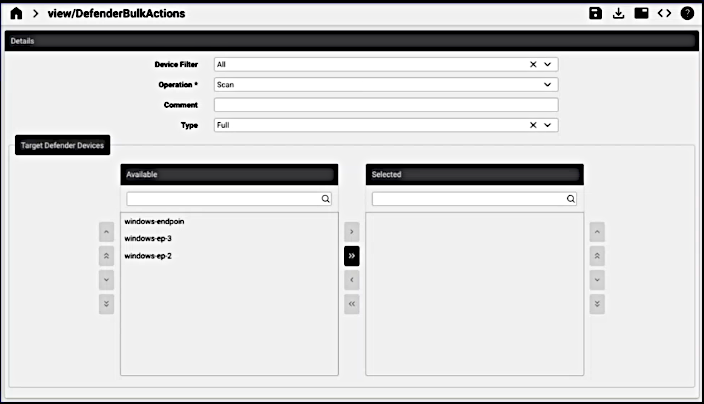
Automate provides an interface to carry out bulk actions on devices. For Target Defender Devices, the Available and Selected transfer boxes are available to select devices accessible from a hierarchy to carry out operations in bulk:
Device Filter: by operating system - all, Windows, macOS, Linux, Android, IOS
Operation: Scan, isolate, un-isolate, offboard, restrict code execution, unrestrict code execution
Type: full, quick
Machine Action#
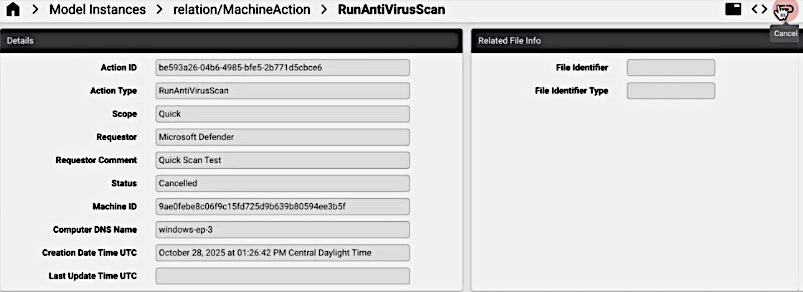
The relation/MachineAction model is available to allow for the execution of Cancel action.
(This action sends a request to device/mssecurity/MachineActionCancel.)
Related Topics