
Search in Automate#
Overview#
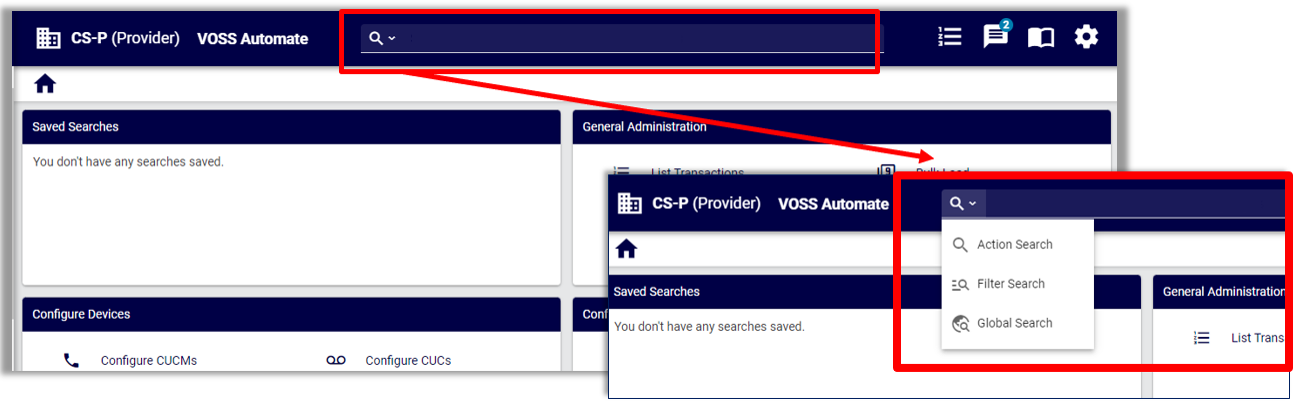
Automate provides three search types via a Search field on the GUI toolbar:
Search Mode |
Description |
|---|---|
Action search |
Default. Searches for entries or actions available on the menus and dashboards. |
Filter search |
Choose from a predefined list of entities to launch a Filter dialog, where you can add additional criteria to filter results. |
Global search |
Performs a search based on all or part of a search term that queries the API for the relevant model and search criteria. |
For further details, see:
For details on using Wingman for chat, see: Wingman. To toggle between search modes, click the down-arrow at the search icon. The last used search mode and search criteria text is retained during the current session in the browser and when you log out and log in again.
Related topics
Search types#
Action search#
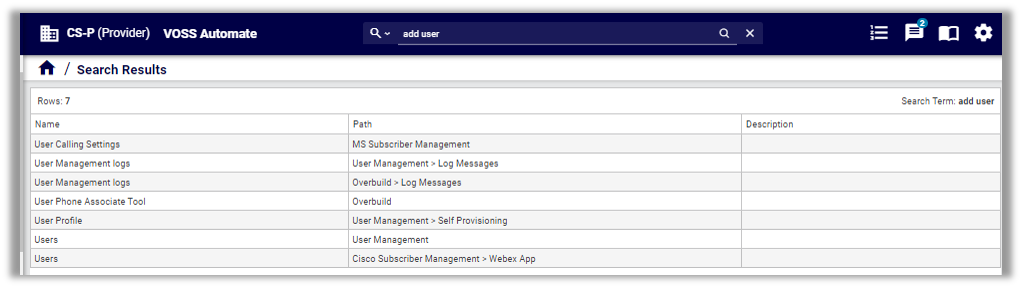
Action search is the default search mode in Automate. It is a case-insensitive, fuzzy, free text search that includes the contains condition. Search results are based on the menus and dashboard links for your role, as well as on the menu or dashboard path (where to find the entry), and descriptions (when populated).
You can use the Action search to fill out a search phrase or single word to navigate quickly to a relevant form, view, or list. All relevant items are returned.
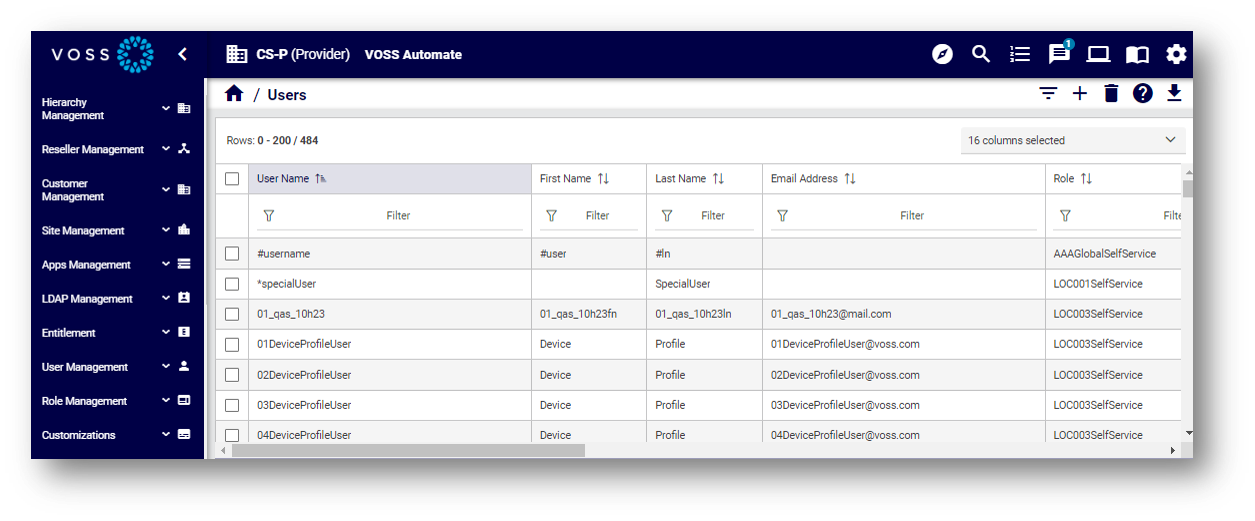
When searching for user, results include Phones because Phones is an item included under the (Cisco) User Management menus.
When searching for settings, the search result includes the macro entry for Emergency and CLI Settings, since the word settings is included in the name.
Including add in your search phrase generates results for create and add.
You can click on a search result to open it in the system.
Related topics
Filter search#
In a Filter search you choose from a predefined list of entities (based on your role) to launch a Filter dialog, where you can further refine the criteria to filter results.
Tooltips for the entity display the path to the entity. Where duplicate entities appear in the list, the tooltip indicates the difference.
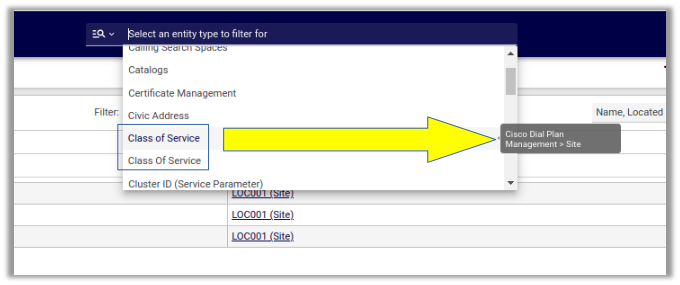
Select an entity to open a Filter dialog, where you can refine search criteria, if required.
For further details around using a filter search, see Filtering lists in the Admin Portal in Working with lists.
Global search#
Note
The Global search from the Search bar is only available to a user with a role that
has an access profile with Permitted Type containing tool/* (and no restriction on tool/Search) or
Type Specific Permissions containing tool/Search. Otherwise, the search bar is hidden.
For details on Access Profiles, see: Introduction to access profiles.
A Global search from the Search bar performs a search based on all or part of a search term that queries the API for the relevant model and search criteria. Results display as a list of links, showing the models.
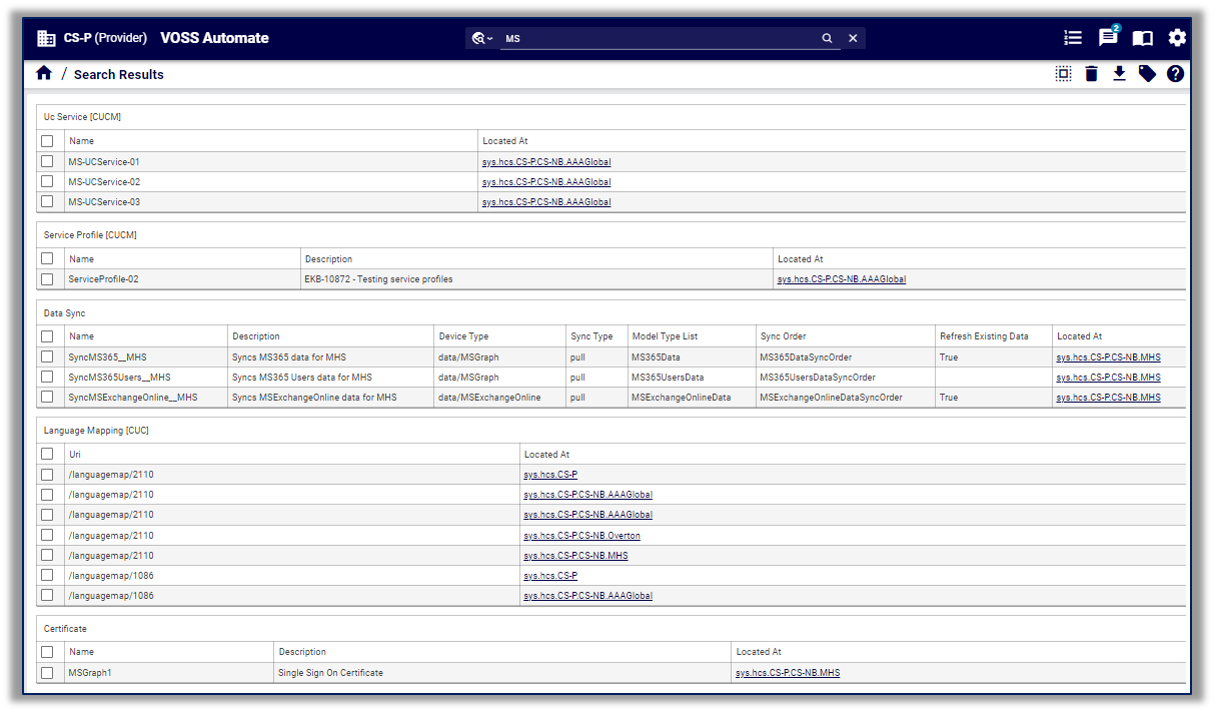
You can select the checkbox adjacent to a search result (one or more), then click a toolbar action, such as Delete, or select an option from the Action drop-down (for example, Export or Tag. Actions allowed on search results are permissions-based, depending on your access profile, with caveats on the number of items, relations, and device models:
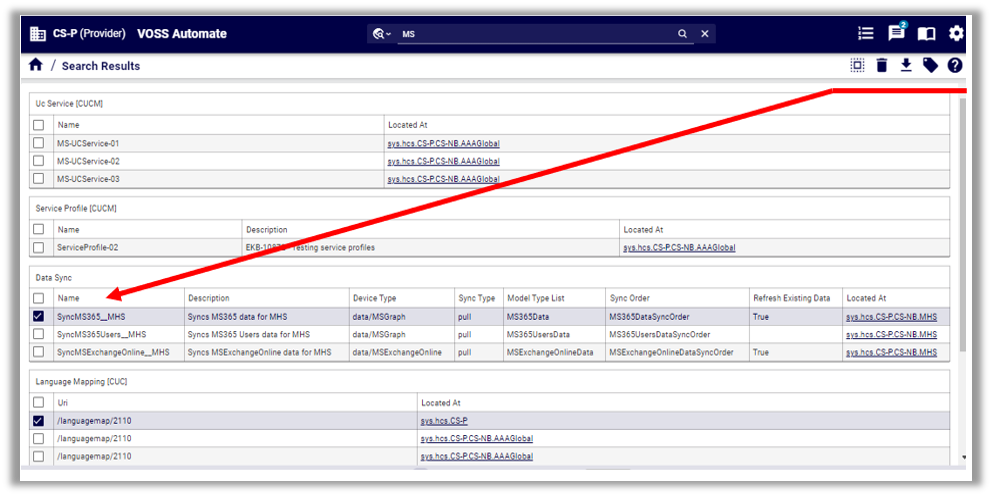
In a global search the maximum number of rows the system returns is 2000. The page size limit is 200 rows.
Search results are returned for your current hierarchy and below.
Click on a search result to open it and view its details.
From a selected search result, you can click on the Search Results breadcrumb to see all results again.
Search results for a simple string search matches the contains condition in the text of a component.
Simple search strings match values in data and device models (relations instances are not returned). To search the relation model instances, specify the model as a part of the query.
Case-insensitive searches on field names are supported on several models. See Case-insensitive search fields.
You can search on the summary attributes of any models, and for some models you can also search on a subset of their attributes. See: Searchable fields.
Selecting a data or device model instance returned in a search displays the full model details; that is, without a Field Display Policy applied.
Constructing search queries for Global search#
Search syntax#
For Global search, you can construct search queries to search for specific items, based on Automate search syntax filters.
Search queries can contain:
Model type and model name references
Model attribute and nested model attribute references
Key words
Brackets, for grouping
Query string, using valid query string characters, as follows:
alphanumeric characters
Any of:
!@#$%^&*-_=+<,.>/?\|[{]}~`To search for single quote in a string, wrap the string in double quotes
To search for double quote in a string, wrap the string in single quotes
Search queries are carried out on models, so you can specify the model type and the model name in a
query, using the syntax type/name as the full reference to a model type (for example, relation,
data, or device) and model name (for example, Countries).
Search keyword types#
Various keywords can be used to construct a search query. Available keywords are categorized by type, either of the following:
Specification - WITH
Matching - IS, LIKE
Grouping - AND, OR
Keyword |
Description and Examples |
|---|---|
WITH |
Restricts the search to look for only specific data types. In the example below we have specified the data type Countries and so only countries will be returned. ((data/Countries WITH country_name LIKE Kingdom) AND
(data/Countries WITH country_name LIKE Unite ))
|
IS |
For a result to be returned the data attribute must match exactly the ‘input’. In the example below the ‘input’ is Spain and only a Country with the attribute country_name Spain will be returned. If ‘North Spain and South Spain existed they would not be returned. In the example below we have specified the data type Countries and so only countries will be returned. If we had not specified a data type then the search would cover all data types looking for an attribute country_name. country_name IS Spain
data/Countries WITH country_name IS Spain
Another example with a model tag as reference: tag IS "feature"
|
CONTAINS |
Matching is done by substring and is the default parameter. For a result to be returned, the data attribute must contain ‘input’. In the example below, the ‘input’ is ‘Sw’ and the search would find both ‘Sweden’ and ‘Switzerland’. data/Countries WITH country_name CONTAINS Sw
|
Keyword |
Description and Examples |
|---|---|
LIKE |
Matching is done by fuzzy search. For a result to be returned, the data attribute must nearly match ‘input’. In the example below, the ‘input’ is ‘swe’ and the search would find both ‘Sweden’ and ‘Switzerland’. data/Countries WITH country_name LIKE swe
|
AND |
This grouping term allows you to combine different searches and only finds a result where both conditions are met. The example below the search would find ‘United Kingdom’ but not the ‘Kingdom of Bhutan’ as in this case the second condition (LIKE Unite) is not true. ((data/Countries WITH country_name LIKE Kingdom) AND
(data/Countries WITH country_name LIKE Unite ))
|
OR |
This grouping term allows you to combine different searches and matches a result where any one or both of the conditions are met. The example search below would find ‘United Kingdom’, ‘United States’ and ‘Kingdom of Bhutan’. ((data/Countries WITH country_name LIKE Kingdom) OR
(data/Countries WITH country_name LIKE Unite))
|
Search examples#
Where the attribute of a model is nested in an object, the reference to the attribute in the search query requires a model type specification.
For example, for a model data/User with an attribute in a nested object
called account_information, the query should take the model type
(data) specifier:
data/User WITH data.account_information.credential_policy IS Default
The following query will not yield results:
data/User WITH account_information.credential_policy IS Default
Brackets should be used in a query with matching and grouping operators. In a query containing no model references, brackets are evaluated first. The order of bracket evaluation is inner to outer brackets.
Example Queries (line breaks added):
(((data/Countries WITH pstn_access_prefix IS 9) AND
  (data/Countries WITH emergency__access_prefix IS 112))
 OR (data/Countries WITH international_access_prefix IS 00))
Search string format#
The string to search for can be specified with the following properties:
Multi-word and quotes
When searching for a multi-word string value like “United States”, the value must be enclosed in either single quotes:
'United States', or double quotes:"United States".When single word or multi-word values contain a single or double quote, the string needs to be enclosed in double or single quotes respectively, for example:
"L'Amour".Case sensitivity
Use the appropriate operator (LIKE)
In a query containing model references, brackets and grouping keywords, the query is evaluated in the order shown in the table below.
Order |
Element |
Description |
|---|---|---|
1 |
WITH |
Model reference is evaluated first. |
2 |
brackets |
Brackets evaluate before grouping keywords. |
3 |
AND |
AND grouping evaluates before OR grouping. |
4 |
OR |
Evaluates last. |
A number of attributes from the meta data of a model can also be searched:
__device_pkid: if a device pkid is known, then for example:device/cucm/Line WITH __device_pkid IS 55c32b59a6165451e04f392apkid: if a pkid is known, then for example:data/CallManager WITH pkid IS 55c32b59a6165451e04f392atags(can also use “tag”): if the tag name is known, then for example:
((data/FieldDisplayPolicy WITH tag IS feature_tag_add_customer) AND
 (data/FieldDisplayPolicy WITH tags IS applicationendtoend))
Note
Only lower-case tags are searchable.
“Contains” search in drop-down lists#
On forms where you select values from pre-populated, editable drop-down lists, Automate allows you to run a case-insensitive “contains” search to filter across the entire result set for the drop-down. Paginated scrolling is supported for large result sets.
To run a “contains” search in a drop-down list:
Start typing any value in a drop-down field.
Select the relevant option from the result set.