
Customer HCS Dial Plan#
Overview#
For Cisco HCS dial plans, you must create a customer dial plan before you create the site dial plan.
Cisco HCS dial plan schemas are configured such that the customer-level dial plan elements are not pushed to UCM until the first site for the customer is deployed. Therefore, you won’t see any dial plan elements provisioned on the UCM until at least one site is deployed for the customer.
Once you add a customer dial plan, the only change allowed is to enable CSS filtering.
Related topics
Add a Cisco HCS customer dial plan#
This procedure adds a new Cisco HCS dial plan for a customer.
Note
You can only add one dial plan per customer.
The options you choose define the type of Cisco HCS dial plan schema to be used (Type 1 to 4).
Log in to the Admin portal as Provider or Customer admin.
Note
For details around tasks that can be performed for each admin level, see Dial plan roles and privileges.
Go to Dialplan Tools > Customer HCS Dial Plan.
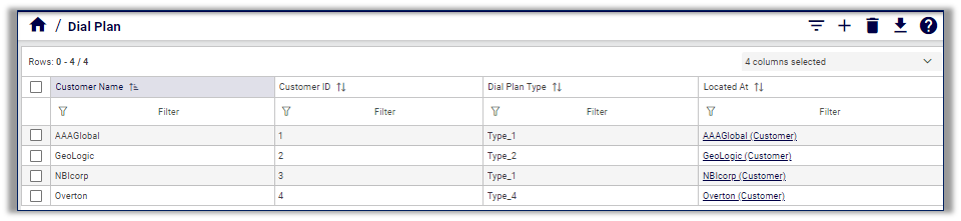
Click the Plus icon (+) to add a new customer dial plan.
Select the customer to open the Customer HCS Dial Plan > New Record page.
Note
Customer ID is a read-only, unique, auto-generated number allocated to the customer. Customer ID is particularly useful in shared deployments (where a cluster may be shared across multiple customers) to correlate specific elements to a customer. Customer ID displays in Cisco UCM as a prefix to elements (for example Cu2Si7 identifies Customer 2, Site 7).
Optionally, at Default External Breakout Number add a PSTN Access prefix, if required.
Is a site-location (SLC) required?
No. Leave Site-Location Code (SLC) based dial plan clear (unchecked). Go to Step 7.
Yes. Select Site-Location Code (SLC) based dial plan. Select options for the following additional fields that display. When you’re done, go to Step 7:
Optionally, select Use extension prefix, and fill out an extension prefix, if required.
Optionally, select Inter-Site Prefix required for inter-site dialing, and fill out the inter-site prefix (ISP), if required. The ISP can be just one digit.
If you’re applying an inter-site prefix (ISP), define whether the ISP is included in the directory number.
If the ISP is to be included in the directory number, define whether the ISP is included in the Voice Mail ID.
Define whether to Enable CSS filtering.
When enabled, CSS filtering filters the Calling Search Spaces (CSSs) when configuring a user, phone, or line, to Site level Class of Service (CoS) CSSs.
When disabled (default), all available Cisco UCM CSSs are available when configuring a user, phone, or line.
Save the form to add the new customer dial plan.
For add, update, or delete, you can view transaction progress and details in the Transaction Logs.
Note
When adding lines (DNs) at the site level, you must define your DNs appropriately (that is, you are responsible for using ISP+SLC+EXT if you deploy a Type 2 dial plan). Otherwise your inter/intra site calls won’t route. For details around defining directory numbers, see Number range management.
Related topics