
Introduction to Insights monitoring#
Overview#
Users with both Automate and Insights deployed can enable monitoring of UC applications via the Automate Admin Portal, from an Insights Arbitrator server integrated with Automate.
Note
For details around integrating Automate with the Insights Arbitrator server, see Insights Assurance Arbitrators
Once the integration is set up, you onboard customer server clusters, comprising one or more Cisco Unified Communication Manager (UCM) CallManager servers and/or Cisco Unity Connection (CUC) servers, to an Arbitrator server for monitoring, from within the Automate Admin Portal.
The following servers are supported:
Cisco Unity Connection (CUC) servers
Cisco UCM servers
Provisioning is supported for these UCM server types:
Voice (VOICE_VIDEO)
IM and Presence Service (IM_P)
Note
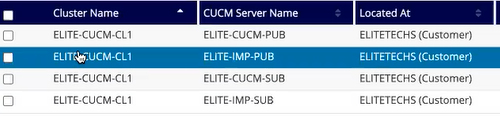
The image displays a customer with four Cisco UCM servers that are part of the same cluster. The cluster is onboarded to the Arbitrator server for monitoring purposes.
This feature provides the following functionality in the Admin Portal:
Integrate Arbitrator servers, and view existing integrations, via the Insights Arbitrators page in Automate. See Insights Assurance Arbitrators
Note
The Arbitrator server should be at version SP23 or higher.
View currently configured monitoring set up for server clusters, if any:
For UCM servers, go to the Servers page (for UCM), then click on a cluster to view the following:
On the Base tab, view the cluster name and server type (VOICE_VIDEO or IM_P), and whether the server is a Publisher server or a Subscriber server.
On the Publisher tab, view monitoring details, including the monitoring Arbitrator server, if any.
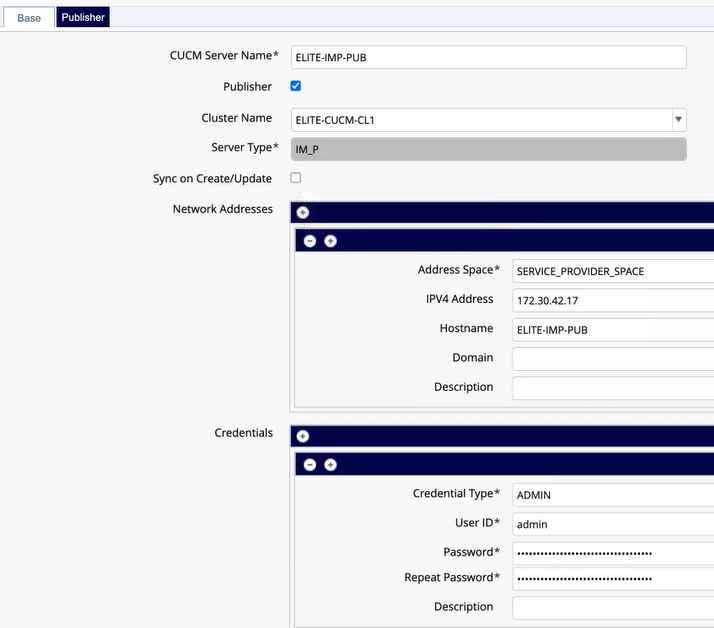
For CUC servers, go to the CUC Servers page, then click on a cluster to view monitoring details, including the monitoring Arbitrator server, if any.
When adding new UCM or CUC server in a cluster, you can choose an Arbitrator to monitor the servers (via the Monitoring fields for Cisco Publisher servers)
Note
At the time of writing (Automate v21.3), modifying any existing monitoring setup on UC apps is not supported. However, deleting a UC app on Automate will remove the asset and related configuration from all corresponding Insights Arbitrator servers.
Onboarding provisioning#
The onboarding process triggers a workflow that finds all the servers in the cluster, then provisions all required monitoring elements (which differ depending on whether the server is UCM or CUC, Publisher or Subscriber, or CUCM server type VOICE_VIDEO, or IM_P).
Note
You can view all workflow provisioning steps via the transaction log in the Admin Portal.

The table describes the onboarding provisioning that occurs for the server types supported for Arbitrator monitoring:
Server in the cluster |
Onboarding Provisioning |
|---|---|
CUCM VOICE Publisher (PUB) |
Provisioning on Arbitrator:
Provisioning on the CallManager:
|
CUCM VOICE Subscriber (SUB) |
Provisioning on Arbitrator:
|
CUCM IM_P Publisher (PUB) |
Provisioning on Arbitrator:
|
Server in the cluster |
Onboarding Provisioning |
|---|---|
CUCM IM_P Subscriber (SUB) |
Provisioning on Arbitrator:
|
CUC Publisher (PUB) |
View the transaction and sub-transaction log for details. |
CUC Subscriber (SUB) |
View the transaction and sub-transaction log for details. |
For details, see Onboard assets
Note
All provisioned elements can be viewed on the Insights Arbitrator dashboard. For details, see the Insights documentation.
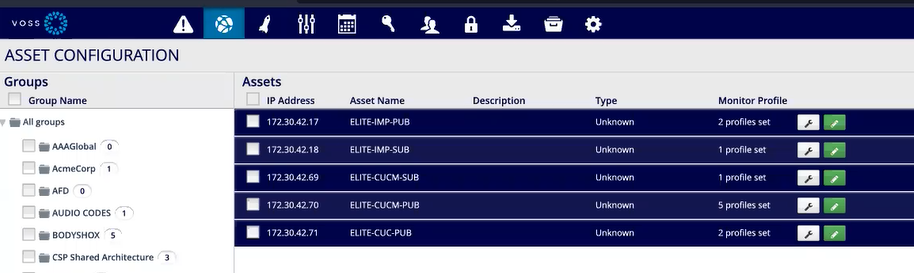
Probe groups, profiles, and asset onboarding#
The table describes the probe groups and profiles that are added to the Insights Arbitrator server when assets are onboarded, and removed when assets are off-boarded.
PERFMON CUCM Group Profile |
|
|---|---|
Probe name |
|
Probe Group Name |
|
Frequency |
600 sec (10 min) |
For Publisher Server |
Yes |
For Subscriber Server |
No |
PERFMON CUC Group Profile |
|
|---|---|
Probe name |
|
Probe Group Name |
|
Frequency |
300 sec (5 min) |
For Publisher Server |
Yes |
For Subscriber Server |
No |
RIS Group Profile |
|
|---|---|
Probe Group Name |
|
Frequency |
300 sec (5 min) |
For Publisher Server |
Yes |
For Subscriber Server |
No |
PINGMON Group Profile |
|
|---|---|
Probe Group Name |
|
Frequency |
300 sec (5 min) |
For Publisher Server |
Yes |
For Subscriber Server |
Yes |
VERSION Group Profile |
|
|---|---|
Probe Group Name |
|
Frequency |
86400 sec (24 hr) |
For Publisher Server |
Yes |
For Subscriber Server |
No |
RTMT Group Profile |
|
|---|---|
Probe Group Name |
|
Frequency |
1800 sec (30 min) |
For Publisher Server |
Yes |
For Subscriber Server |
No |
Offboarding assets#
Should you wish to disable monitoring and remove data from the Arbitrator server, you can offboard these assets (and their related configuration) from the Arbitrator server. For details see Offboard assets