Automate deployment topologies#
Tutorial: videocam
If you found this video helpful, you can find more at Tutorials Home.
Overview#
Automate offers two main deployment topologies:
Two additional deployment options are available:
Node types#
Automate deployment topologies are comprised of a configuration of the following types of nodes, each performing specific functions within the topologies:
Web proxy node
Unified/single node
Application node
Database node
Each node type is comprised of one or more of the following components (software subsystems):
Component |
Description |
|---|---|
Operating system |
Ubuntu, stripped down / hardened |
Platform |
Docker, isolated components |
Web server |
Nginx, receives and forwards HTTP requests
|
Database |
MongoDB (scalable, distributed), PostgreSQL (scalable) |
Application |
JavaScript, Python, REST API, device drivers, workflow engine, transactions/queue engine, RBAC, search, bulk loader, and more … |
The matrix outlined in the table describes the set of components in each node type:
Node type |
Components |
||||
|---|---|---|---|---|---|
Operating system |
Platform |
Web server |
Database |
Application |
|
Web proxy |
X |
X |
X |
||
Unified/single node |
X |
X |
X |
X |
X |
Application |
X |
X |
X |
||
Database |
X |
X |
X |
||
Unified node cluster topology#
Automate’s unified node cluster topology provides the following options:
Single-node cluster (cluster-of-one/standalone) (testing-only)
Single-node cluster (cluster-of-one/standalone) with VMWare HA
Two node with web proxies
Important
Choose between a unified node deployment or a modular architecture deployment.
In a unified node cluster deployment, Automate is deployed as one of the following:
A single unified node cluster
Two unified nodes
A cluster of multiple nodes with High Availability (HA) and Disaster Recovery (DR) qualities
Each node can be assigned one or more of the following functional roles:
Functional role |
Description |
|---|---|
Web proxy |
Load balances incoming HTTP requests across unified nodes. |
Single unified node |
Combines the Application and Database roles for use in a non-multi-clustered test environment. |
Unified |
Similar to the Single unified node role Application and Database roles, but clustered with other nodes to provide HA and DR capabilities. |
The nginx web server is installed on the web proxy, Single Unified Node, and the Unified Node Cluster, but is configured differently for each role.
In a clustered environment containing multiple unified node clusters, a load balancing function is required to offer HA (High Availability providing failover between redundant roles).
Automate supports deployment of either the web proxy node or a DNS load balancer. Consider the following when deciding whether to select a web proxy node or a DNS:
The web proxy node takes load off the unified node cluster to deliver static content (HTML/JAVA scripts). When using DNS or a third-party load balancer, the unified node cluster must process this information.
DNS is unaware of the state of the unified node cluster.
The web proxy detects if a unified node cluster is down or corrupt. In this case, the web proxy will select the next unified node cluster in a round robin scheme.
Important
It is recommended that you run no more than two unified node clusters and one web proxy node on a physical (VMware) server.
Additionally, it is recommended that the disk sub-systems are unique for each unified node cluster.
The table describes the defined deployment topologies for test and production:
Deployment topology |
Description |
|---|---|
Test |
A standalone, single unified node, with Application and Database roles combined. No high availability or disaster recovery (HA/DR) is available. Important A test deployment must be used only for test purposes. |
Production with unified nodes |
In a clustered system, comprising:
|
Single-node cluster (cluster-of-one/standalone) (testing-only)#
Note
A Single-node cluster (cluster-of-one/standalone) deployment should be used only for test purposes.
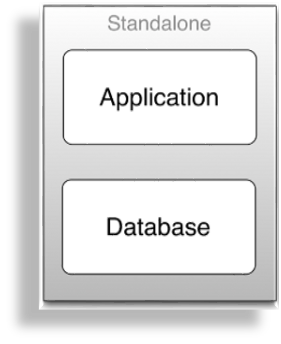
The table describes the advantages and disadvantages of a Single-node cluster (cluster-of-one/standalone) deployment topology:
Advantages |
Disadvantages |
|---|---|
|
|
Single-node cluster (cluster-of-one/standalone) with VMWare HA#
The table describes the advantages and disadvantages of a Single-node cluster (cluster-of-one/standalone) with VMWare HA deployment topology:
Advantages |
Disadvantages |
|---|---|
|
|
Multi-node cluster with unified nodes#
To achieve geo-redundancy using the unified nodes, consider the following:
Either four or six unified nodes (each node combining Application and Database roles), are clustered and split over two geographically disparate locations.
Two web proxy nodes to provide high availability, ensuring that an Application role failure is gracefully handled. More may be added if web proxy nodes are required in a DMZ.
Important
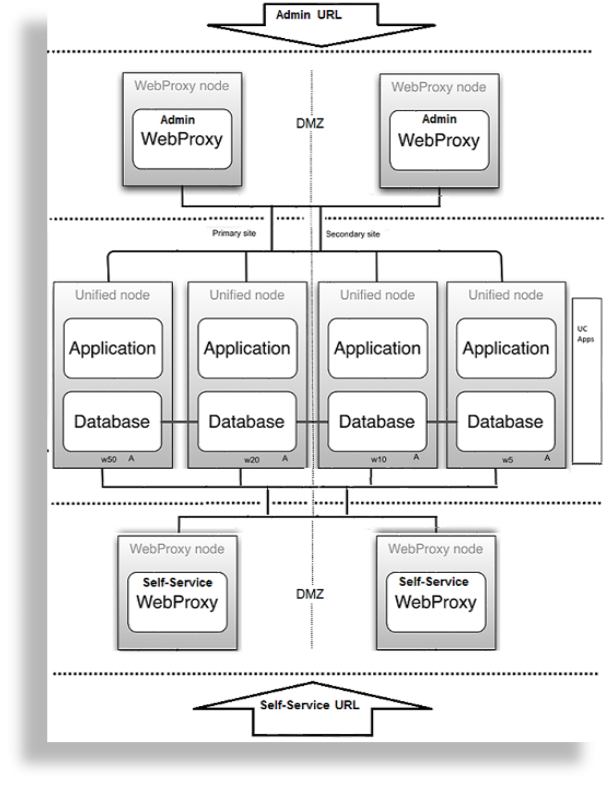
It is strongly recommended not to allow customer end-users the same level of administrator access as the restricted groups of Provider- and Customer administrators. For this reason, Self-service web proxies as well as Administrator web proxies should be used.
Systems with Self-service-only web proxies are only recommended where the system is customer facing, but where the customer does not administer the system themselves.
Web proxy and unified nodes can be contained in separate, firewalled networks.
Database synchronization takes places between all database roles, thus offering disaster recovery and high availability.
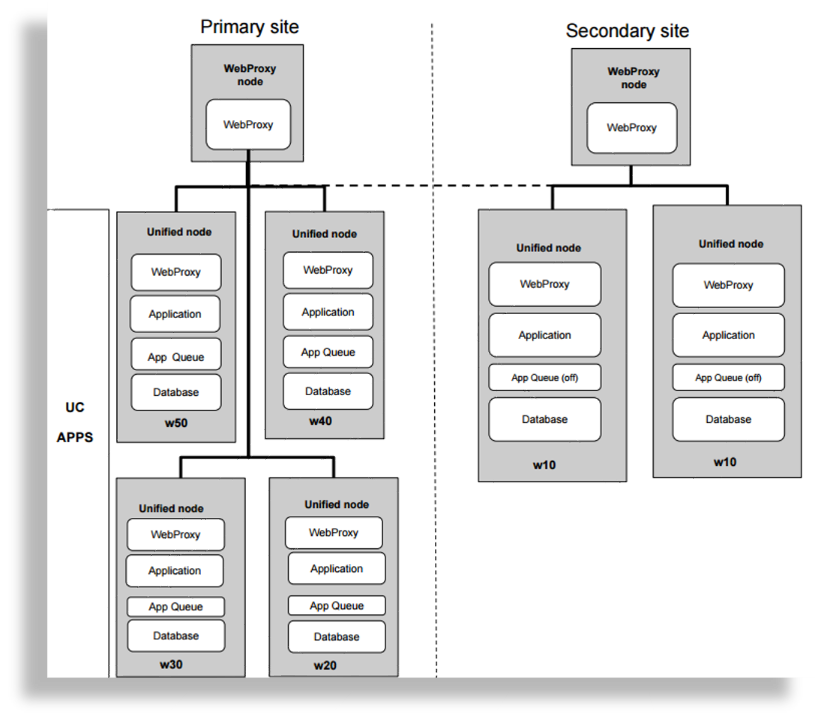
For six unified nodes, all nodes in the cluster are active. For an eight node cluster (with latency between data centers greater than 10ms), the two nodes in the disaster recovery node are passive; that is, the
voss workers 0command has been run on the disaster recovery nodes.
Note
Primary and fall-back secondary database servers can be configured manually. Refer to the Automate Platform Guide for details.
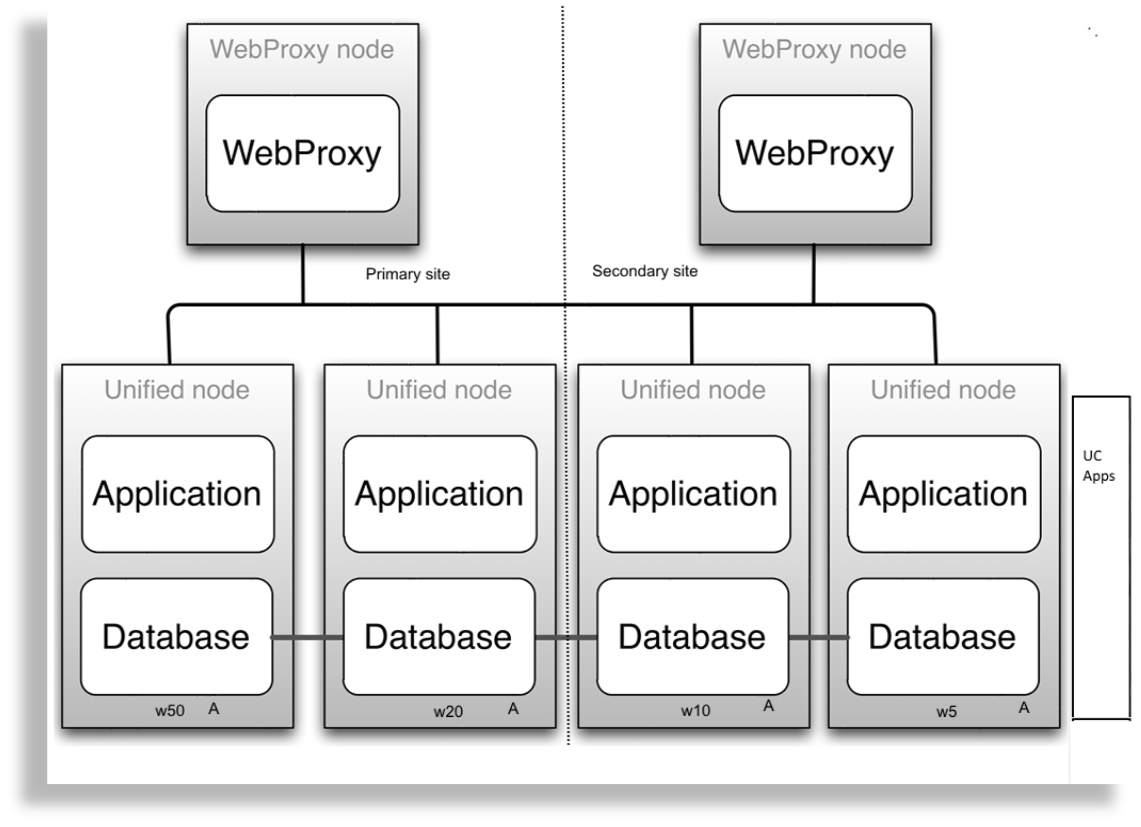
Example: Six node cluster
The diagram illustrates an example of a six node cluster:
Example: Eight node cluster
The diagram illustrates an example of an eight node cluster:
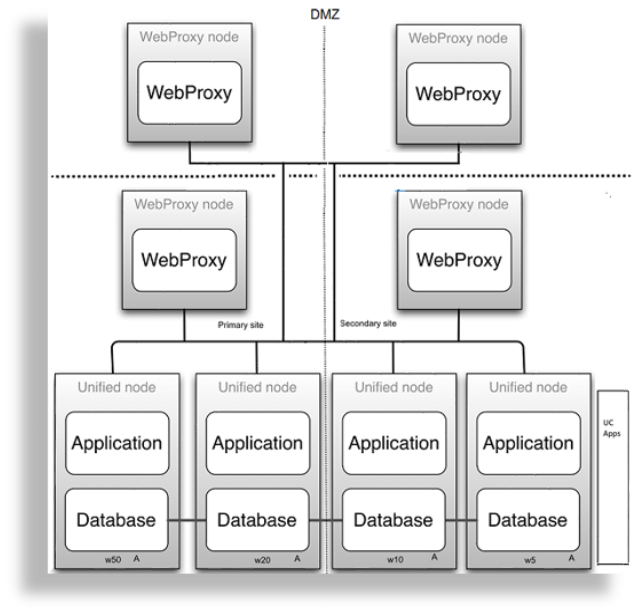
Example: Two web proxy nodes in a DMZ
The diagram illustrates an example of two web proxy nodes in a DMZ:
Example: Four web proxy nodes in a DMZ (two admin, two Self-service)
The diagram illustrates an example of four web proxy nodes (2 admin, and 2 Self-service) in a DMZ:
Two node cluster with unified nodes#
To achieve geo-redundancy using the unified nodes, consider the following:
Two unified nodes (each node combining application and database roles) are clustered and optionally split over two geographically disparate locations.
(Optional) Two web proxy nodes can be used. It may be omitted if an external load balancer is available.
Web proxy and unified nodes can be contained in separate firewalled networks.
Database synchronization takes place from primary to secondary unified nodes, thereby offering disaster recovery if the primary node fails.
If the secondary unified node has more than 10ms latency with the primary unified node, it must be configured to be in the same geographical location.
Important
With only two unified nodes, with or without web proxies, there is no high availability. The database on the primary node is read/write, while the database on the secondary is read-only.
Only redundancy is available in the following instances:
If the primary node fails, a manual delete of the primary node on the secondary and a cluster provision will be needed.
If the secondary node fails, it needs to be replaced.
Refer to the topic on Disaster recovery failover and recovery in a two node cluster in the Platform Guide.
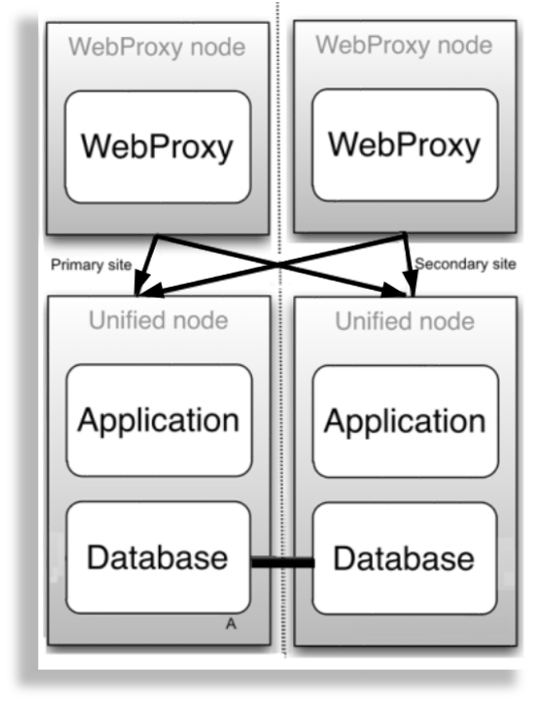
Example: Two node cluster
The diagram illustrates a two node cluster:
Four node with web proxies#
The table describes the advantages and disadvantages of a four node with web proxies deployment topology:
Advantages |
Disadvantages |
|---|---|
|
|
Six node with web proxies#
The following are characteristics of a six node with web proxies deployment topology:
Typically deployed for multi-data center deployments
Supports Active/Standby
Modular node cluster deployment topology#
Overview#
A modular node cluster topology has separate Application and Database nodes:
Three Database nodes
One to eight Application nodes
Web proxies
A modular node cluster* topology has the following advantages:
Increased processing capacity
Horizontal scaling by adding more Application nodes
Improved database resilience with dedicated nodes and isolation from application
Improved database performance by removing application load from the primary database
Important
Choose between a Unified Node Cluster deployment or a Modular Node Cluster deployment.
Automate is deployed as a Modular Node Cluster of multiple nodes, with High Availability (HA) and Disaster Recovery (DR) qualities.
Each node can be assigned one or more of the following functional roles:
Functional role |
Description |
|---|---|
Web proxy |
Load balances incoming HTTP requests across nodes. |
Application role node |
Clustered with other nodes to provide HA and DR capabilities. |
Database role node |
Clustered with other nodes to provide HA and DR capabilities. |
The nginx web server is installed on the web proxy and application role node, but is configured differently for each role.
Related topics
* Modular Architecture Multi-node Installation
* Migrate a Unified Node Cluster to a Modular Node Cluster
A load balancing function is required to offer HA (High Availability providing failover between redundant roles).
Automate supports deployment of either the web proxy node or a DNS load balancer. When choosing between a web proxy node and a DNS, consider the following:
The web proxy takes load off the Application role node to deliver static content (HTML/JAVA scripts). When using DNS or a third-party load balancer, the Application role node has to process this information.
DNS is unaware of the state of the Application role node.
The web proxy detects if an Application role node is down or corrupt. In this case, the web proxy will select the next Application role node in a round robin scheme.
Important
It is recommended that you run no more than one Application role node and one Database role node and one web proxy node on a physical (VMWare) server. When choosing disk infrastructure, high volume data access by database role replica sets must be considered where different disk sub-systems may be required depending on the performance of the disk infrastructure.
The following Modular Node Cluster topology is recommended (minimum):
Important
Single Unified Node topologies are not available for Modular Node Cluster deployments.
Production with nodes (in a clustered system of two data centers):
DC1 = Data center 1, a primary data center containing primary database node (highest database weight)
DC2 = Data center 2, a data recovery data center
The system comprises of the following nodes:
Three nodes with application roles (two in DC1; one in DC2)
Three nodes with database roles (two in DC1; one in DC2)
Maximum two web proxy nodes if two data centers; offering load balancing. The web proxy nodes can be omitted if an external load balancer is available.
Multi-node modular node cluster with application and database nodes#
To achieve geo-redundancy using Application and Database nodes, consider the following:
Six Application and Database nodes (three nodes with an application role and three nodes with a database role) are clustered and split over two geographically disparate locations.
Two web proxy nodes to provide High Availability so that an Application role failure is gracefully handled. More may be added if web proxy nodes are required in a DMZ.
Important
It is strongly recommended not to allow customer end-users the same level of administrator access as the restricted groups of Provider- and Customer administrators. For this reason, Self-service web proxies as well as Administrator web proxies should be used.
Systems with Self-service-only web proxies are only recommended where the system is customer facing, but where the customer does not administer the system themselves.
Web proxy, Application and Database nodes can be contained in separate firewalled networks.
Database synchronization takes places between all database role nodes, thus offering disaster recovery and high availability.
All nodes in the cluster are active.
Note
Primary and fall-back secondary database servers can be configured manually. Refer to the Automate Platform Guide for details.
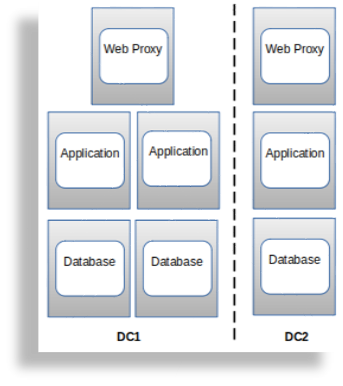
Example: Six node cluster
The diagram illustrates an example of a six node cluster:
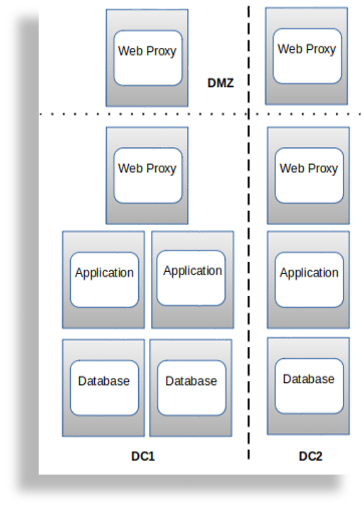
Example: Two web proxy nodes in a DMZ
The diagram illustrates an example of two web proxy nodes in a DMZ:
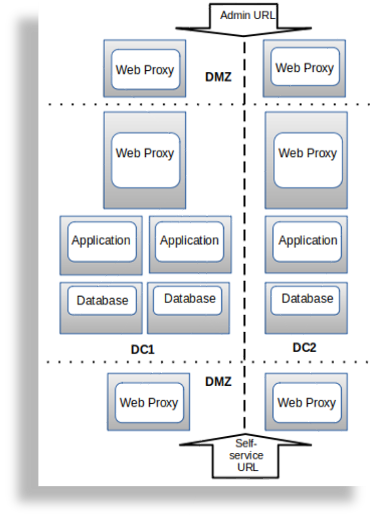
Example: Four web proxy nodes in a DMZ
The diagram illustrates an example of four web proxy nodes in a DMZ (two admin, two Self-service):
Cloud deployments#
Automate supports the following Cloud deployments:
Microsoft Azure
Amazon Web Services (AWS)
Although Google Cloud Platform (GCP) is not officially supported, contact us to discuss your requirements.
Advantages of a Cloud deployment topology:
Leverage cloud tooling, such as proxies (which can be used instead of VOSS Web Proxy)
VOSS Automate Cloudv1 (SaaS)#
VOSS Automate Cloudv1 is a Software-as-a-Service (SaaS) offering hosted on a shared VOSS Automate instance within Microsoft Azure.
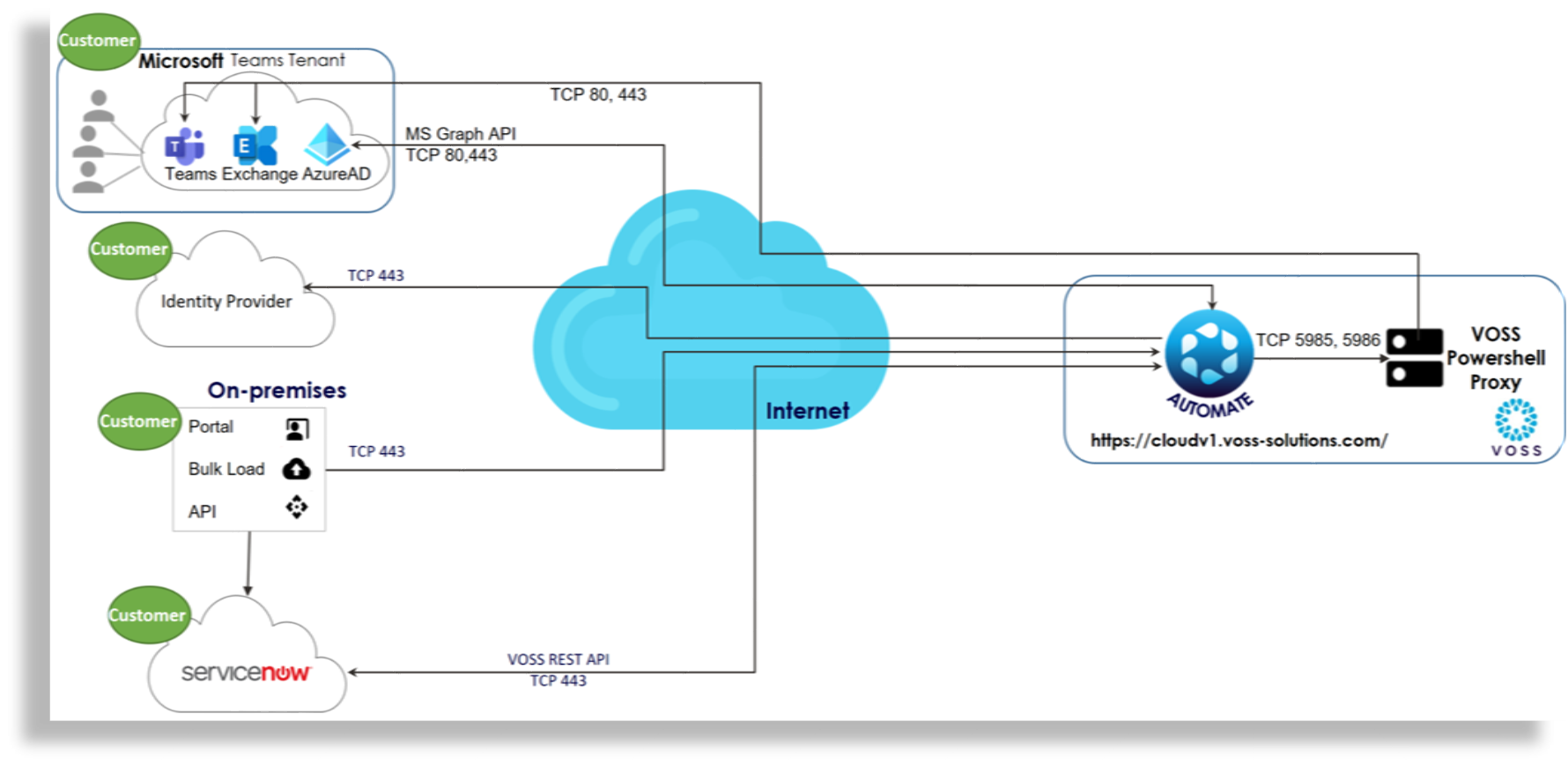
VOSS manages this instance, which seamlessly integrates with a customer’s Unified Communications (UC) platform, Microsoft Exchange, Microsoft Active Directory, and third-party applications, such as ServiceNow and Identity Providers (IdPs) for Single Sign-On (SSO) authentication.