Shared line across sites
Overview
The ability to have shared lines across sites allows lines to be shared across sites, and is accomplished
by introducing the concept of an “inventory site”, in addition to “real sites”:
Devices are only provisioned on real sites (not in the inventory site).
The “shared lines** feature also supports hunt groups and call pickup groups across sites by
leveraging the inventory site to provision all of the lines to be included in the hunt group or
call pickup group.
Lines used in the hunt groups and call pickup groups that are provisioned in the inventory site can span
multiple real sites; that is, they’re used by devices on the real sites. The key requirement is that all
the lines to be used by a given hunt group or call pickup group must be configured in the inventory site,
along with the hunt group and call pickup group itself.
The “shared line across sites” deployment model is 100% backward compatible with the previous directory
number (DN) and line configuration. Existing deployments are not impacted when the system is
upgraded, and all existing dial plan configuration procedures are
supported. The deployment configuration shown in Example of shared line across sites
is optional and is only required when sharing lines across sites.
Tip
If a line is potentially shareable, it is recommended that you create the line in
the inventory site, even if it won’t be shared across sites immediately.
The system does not support the ability to move a line from a real site to an
inventory site, so to convert a line from site-local to cross-site shared, the line would need to be
deleted from the real site and recreated in the inventory site.
Note
See the Glossary for descriptions of the following terms related to shared lines across sites functionality:
Limitations of shared lines across sites
When considering using shared lines across sites, consider the following limitations:
A new inventory site is required for each new combination of network device list (NDL) and Country
(a “site group”); that is, lines configured at the inventory site are specific to the NDL and Country
defined for that site.
All real sites that reference lines in an inventory site must be defined with the same NDL and Country.
Ensure that this requirement is met, as it is not enforced in Automate.
Shared lines can’t span countries or NDLs. This is necessary because
Cisco UCM doesn’t support shared lines across
clusters. The country must be consistent so that line CoSs
(defined in the inventory site) are correct for each device referencing the line (defined in the real site).
Ensure that the correct association is made between inventory sites and real sites, as it is not
enforced in Automate.
When configuring a phone or user at a real site, any reference to a DN
that does not exist in the inventory site results in a new line being created
at the real site as it did prior to this Cisco HCS release. If the inventory site doesn’t exist,
or a line hasn’t been configured in the inventory site first, the system behaves as it did in
previous Cisco HCS releases (backwards compatible).
If a line can be potentially shared, create it in the inventory site before referencing it by any devices.
If the DN is used in a device before it’s configured in the inventory site, the line is created in the
real site and may not have the desired CoS or other configuration desired for a shared line.
When a line has been created (either at the inventory site or a real site), it can’t be moved.
To move the line, delete it and re-add it. For example, if you forget to define the line at the inventory site
first and configure a device with a line, the line is created at the real site. You
would need to delete the line from the real site and add it to the inventory site, then reassign it to the
phone.
A site admin logged in to a real site is not able to see the line
configuration that exists at the inventory site. A custom admin (or above) can view the line configuration
at all of the sites.
The “shared lines across sites** functionality only works when using a flat dial plan since other
dial plans have site location codes in the DN that won’t make sense if the DN is shared by multiple sites.
The default Automate template bundle includes a Type 4 flat dial plan. Other, non-site-specific
custom dial plans can be used.
Self-provisioning does not work for DNs defined at the customer level.
Although an admin can delete inventory sites, this is not recommended. If an inventory site is deleted,
all hunt groups, call pickup groups, voicemail pilot associations, and lines that are part of the
inventory site are deleted. If there are devices on the “real” sites that reference these lines,
they will no longer reference these lines as they will have been deleted. The
customer-level DN inventory is still intact, though no lines are associated
with these DNs because they are deleted when the inventory site is deleted.
The hunt groups and call pickup groups are self-contained to the inventory site and are therefore deleted
as part of the deletion of the inventory site.
When the inventory site is deleted, this deletes all shared lines, Classes of Service, DNR, and any
other configuration added at that site. The shared lines are removed from all devices on “real” sites that may have
referenced them.
If an emergency number is dialed from any shared line, the number displayed on
the other end should be the Emergency Call Back Number of the corresponding site.
Example of shared line across sites
Phones are always configured on real sites, and can use both shared and site-local lines. For example,
each phone can have one site-local line (for example, 1000), and one cross-site shared line (for
example, 9000). The following is a summary of the configuration that
resides at each hierarchy type:
Customer hierarchy
Inventory site, includes:
Line relations - for the DNs to be shared across sites.
Directory Number Routing (DNR) entry for the line relations
configured at this site to make the DNs inter/intra-site dialable.
E.164 inventory - for the line relations configured at this site.
E.164 associations - for the line relations configured at this site.
Line Class of Service (CoS) - for the lines configured at this site. CoS
is discussed in more detail in Class of service for shared line across sites.
Short codes - for the line relations configured at this site.
Real site, includes
DN inventory - for lines to be used only at this site. Note that these
DNs can be shared by multiple phones within the site.
Users - configured via Users page or Quick Add User.
Line relations - for the DNs configured at this site. These line relations
do not have to be configured first; they are configured automatically any
time a phone, extension mobility profile, or remote destination profile
references a line that doesn’t exist in the inventory site.
Directory Number Routing (DNR) - for each of the line relations configured
at this site.
E.164 inventory - for lines created at this site.
E.164 associations - for lines created at this site.
Device Class of Service (CoS) - to be used for the phones configured at
this site.
Phones - these phones can reference lines that were defined in the
inventory site or the Real Site where the phone exists.
Extension mobility - these profiles can also reference lines that were
defined in the inventory site or the Real Site where the phone exists.
Single Number Reach - these profiles can reference lines that were
defined in the inventory site or the Real Site where the profile is defined.
Fields in Automate that reference DNs, such as the Pattern field in the Line
tab of a phone, are in a drop-down list of DN inventory. The drop-down list of
DNs includes inventory defined at the customer level, combined with the inventory
defined at the current site context. The administrator can chose either
a cross-site shared DN or a site-local DN.
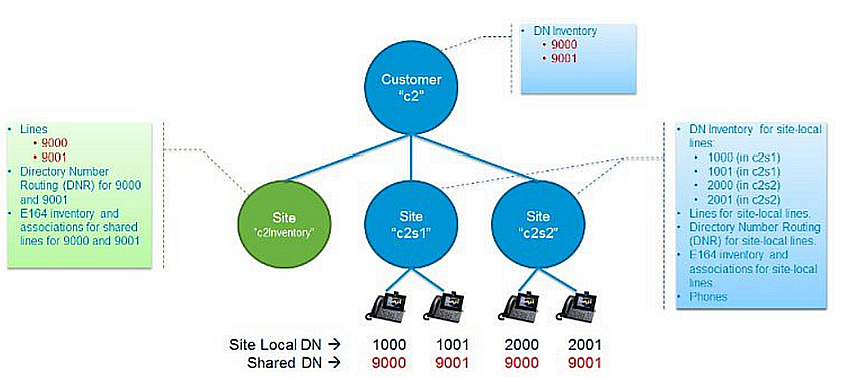
Diagram showing shared line across sites configuration
The image provides a basic shared line across sites configuration:
Uses one inventory site (“c2Inventory”) and two real sites (“c2s1” and “c2s2”)
Shows two shared DNs (9000 and 9001 shown in red) and four site-specific DNs
(1000 and 1001 at c2s1, 2000 and 2001 at c2s2).
The inventory for the shared DNs are provisioned at the customer hierarchy to make them visible to all
sites under the customer. This allows the sites to configure the associated line and assign the line
to a device.
The inventory for the non-shared-across-sites DNs is still configured at the real sites (in blue) as it
was in previous Cisco HCS releases.
Note that both shared DNs and non-shared DNs can co-exist for the same customer.
Dial plan type for shared line across sites
The shared lines across sites functionality only works if you’re using a flat dial plan (Type 4),
or a custom, non-site-specific, dial plan. This is because other dial plans (Types 1 to 3) have
site location codes in the DN that don’t work if the DN is shared by multiple sites.
If you’re using predefined dial plans, ensure the Site Location Code checkbox is clear (disabled)
when deploying the customer dial plan.
Class of service for shared line across sites
Class of Service (CoS) refers to a Calling Search Space (CSS) that is
specifically used to define call routing and feature processing for a
line or a phone.
Several CSSs are defined when a customer and site dial plan are deployed. Some of these
are only used internally (don’t select these CSSs in the CSS drop-downs when configuring a line or phone).
Class of Service CSSs are listed on the Class of Service page. A few example CoSs are predefined when a
site dial plan is deployed, but the intent is for the administrator to
create their own CoSs to meet the desired call routing and feature
processing behavior. Below is a summary of Class of Service as it
pertains to Shared Lines Across Sites feature.
Class of service is used in two places in Automate:
Line calling search space (via the Lines page, Directory Number Basic Information tab, Calling Search Space)
Device calling search space (via User Management GUIs, Phones page or Users page, Calling Search Space Name
setting)
Additionally, CoS can provide line-based routing (LBR) or device-based
routing (DBR). For each call made from a phone, the device CSS of the
phone is combined with the line CSS of the line from which the call is
being made, and the features and routing for the call are processed
based on the combined list of partitions of these two CSSs. The default
set of CoSs provided when a site dial plan is deployed includes a device
CoS for emergency dialing only, and several line CoSs for feature
processing, national dialing, and international dialing and that support
either DBR and LBR. The following table shows the default allocation of
feature and routing duties between the two sets of CoSs.
Feature |
Default Device CoS |
Default Line CoS |
|---|
Emergency call routing |
yes* |
- |
Intrasite routing |
- |
yes |
Intersite routing |
- |
yes |
Local PSTN call routing |
- |
yes** |
National PSTN call
routing |
- |
yes |
International PSTN call
routing |
- |
yes |
Feature processing |
- |
yes |
Table: Default Class of Service for Shared Line Across Sites Feature
* Emergency call routing is dependent on the country configured for the
site. The country is used to route to the correct emergency number for
that country (for example, 911 routes to 112 in the United Kingdom).
Emergency call routing is assigned to the Device CoS because it is
location-dependent, and must be tied to the site where the phone/user
actually resides.
** Local call routing is dependent on local area codes defined in the site dial
plan. The local area codes configured in the site dial plan allow dialing local
dialing (for example 7-digit dialing in the United States).
As shown in the table above, routing is weighted heavily toward the line
CoS because when the CoS is assigned to the line, it applies equally to
the phone, extension mobility, and single number reach, which all
typically share the same line configuration and provide similar dialing
behavior for a given user. However, this assumes that the lines and
devices are all constrained to individual sites. When we open up lines
to be shared across sites, the site-specific configuration becomes more
important in order to determine what to put in the device CoS versus the
line CoS.
Class of Service (CoS) management for Shared Lines Across Sites is
heavily dependent on the customer’s specific deployment scenario. The
distribution of work between the device CoS and the line CoS depends on
the type of country dial plan, and the dialing behavior the customer
wants.
For example, if the country dial plan is flat and closed like the Swiss
dial plan, meaning that the user numbers are not variable length
and there is no site-specific area codes (only national dialing), then
most of the routing can occur in the line CoS because there is not much
site-specific dialing behavior.
However, if the country dial plan uses area codes and the customer wants
a local dialing experience (ability to dial a shorter number such as
7-digit dialing in the United States, and relying on the dial plan to
fill in the local area code), then local call routing must be in the
device CoS because the device context is needed to determine which area
codes to apply to the dialed number. Feature processing partitions can
almost always stay with the line CoS since there is usually no
geographic dependencies for the feature processing. The exception to
this is Time of Day (TOD) routing which may vary depending on the site.
The table provides details for determining how to distribute routing and feature processing
between the line CoS and device CoS.
Feature |
Line CoS |
Device CoS |
|---|
Emergency call routing |
- |
Emergency routing should
always be
location-specific |
Intrasite routing |
Always using the PrelSR
route partition |
- |
Intersite routing |
Always using the PrelSR
route partition |
- |
Local call routing |
When full E.164 number
is always dialed for
offnet calls, for
example, national dial
plans with no local call
routing |
When site-specific area
codes and/or variable
length user
numbers (local dialing
behavior) are defined |
National call routing |
If local dialing is
line-specific, national
dialing should be
line-specific. |
If local dialing is
device-specific,
national dialing should
be device-specific. |
Toll-free call routing |
If local dialing is
line-specific, toll-free
dialing should be
line-specific. |
If local dialing is
device-specific,
toll-free dialing should
be device-specific. |
International call
routing |
If local dialing is
line-specific,
international dialing
should be line-specific. |
If local dialing is
device-specific,
international dialing
should be
device-specific. |
Service call routing |
If local dialing is
line-specific, service
number dialing should be
line-specific. |
If local dialing is
device-specific, service
number dialing should be
device-specific. |
To speed up the process of configuring lines and phones when you create
new Classes of Service, set the site-specific default line CSS and
site-specific default device CSS (Site Management > Defaults). These
fields appear in the following tabs:
Call forward considerations for shared line across sites
As the administrator, you can create the Call Forward CSS as a CoS for a
particular deployment scenario. Considerations must be made based on
whether the local, national, and/or international dialing is configured
on the device CoS or line CoS.
Be aware that if the Call Forward CSS allows national and local PSTN
routing, you may need to consider call forward scenarios when a line is
not associated to a device and PSTN dialing is in the device CoS.
Phone, user, and Quick User for shared line across sites
Phones and users should only be created at real sites and not at inventory sites. However,
the system workflows don’t enforce this rule, but will help facilitate ongoing management
of the configuration data for the customer.
Lines referenced in the Phone screen,
the Users screen, or the Quick Users screen are created
automatically if they have not already been provisioned in the inventory sites and
pushed to Cisco UCM. This is acceptable as long as you
intend for these lines to be only referenced within one site. If a line gets
created on a real site that you intended to share across sites, it is recommended
that you delete the line, and recreate it in the inventory site.
Relevant fields for shared lines across sites on the Phone screen are:
Phone tab: On this tab you specify the Calling Search Space Name (that is,
the device-based routing CoS, which is by default the emergency routing CSS).
Depending on choices made above in the Class of Service section, you might chose a different CSS here.
Lines tab: On this tab you select the DN (Pattern) from the drop-down list, and
configure the E.164Mask used for line presentation. The DN drop-down includes DNs from the
Customer DN inventory combined with the current site DN inventory.
At the time of writing, the E.164Mask is a free-form field and is not tied to the E.164 inventory; it must be
manually entered.
The Route Partition Name field is automatically populated with the correct directory number partition
based on the Pattern (DN) chosen. Similar fields exist in the User tabs.
Hunt groups and call pickup groups for shared line across sites
Hunt groups and call pickup groups can be set up in either the inventory site or in the real sites,
with the following conditions:
Inventory site: When configured in the inventory site, the hunt groups and call pickup groups can
include any line created in that site, but not from other sites.
The recommended setup is to use the inventory site if your hunt group or call pickup group needs to
include lines from multiple sites.
The real sites. When configured in the real site, the hunt groups and call pickup groups can
include lines from the real site, but not from other sites.
Example scenario
The image provides an example of a hunt group that uses lines spanning multiple sites.
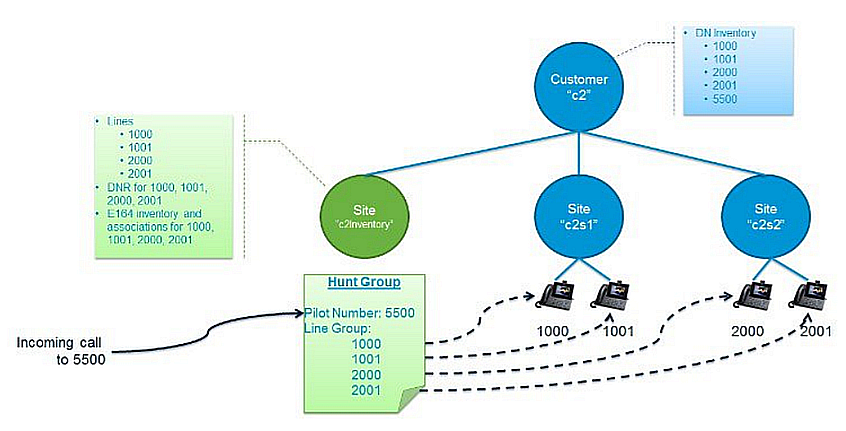
In this example, the hunt group includes the following lines:
These lines are not shared across sites, but to include them all in one hunt group, they must all be configured
at the inventory site so that they can all be grouped under a single hunt pilot number, 5500.
Note
The hunt pilot directory number (DN) inventory is at the customer level.
Once the hunt pilot is assigned, that DN becomes unavailable for other uses:
Handling voicemail to secondary shared lines
To handle voicemail to secondary shared lines, create a separate user
for each shared line at the Inventory Site level, then enable the voice
mailbox for that user so that it can be managed by all shared lines.
This approach:
Offers the ability to differentiate between voice mail deposited for primary
and secondary lines
Provides separate message waiting indication (MWI) notifications for voice mail
in the phone’s primary and secondary line
Allows all configuration to be done in Automate. There are no separate manual
configurations required in Cisco Unity Connection (CUC) or Cisco Unified Communications
Manager (UCM).
Note
One additional license is required for the shared line user mailbox.
