
Dot notation#
Overview#
Dot notation is used to reference macro functions, model attributes, defined variables, step references, and non-attribute values in the model schema.
Dot notation is a structured way to access:
Macro functions
Model attributes
Defined variables
Workflow steps
Non-attribute metadata
It is a pathing syntax that lets you drill into specific values or functions within the platform’s data models and templates.
Syntax patterns and usage#
fn.macrofunction_nameCalls a macro function. See the Macro Functions section in the Advanced Configuration Guide.
self.attributeRefers to the current model’s attribute.
Note
attributemust be a valid attribute name of the calling model (typically within a configuration template).previous.attributeRetrieves the previously saved value of an attribute. Useful when comparing against the current value during model updates.
input.attributeIdentifies values provided via GUI input, bulk load, provisioning workflow foreach variable or context.
pwf.variablenameReferences a variable defined in a provisioning workflow step.
cft.attributeAccess values from the current
context_varof aforeachloop within a configuration template.modelname.attributeDefaults to referencing the data model type.
modeltype.modelname.attributeUsed for non-data model types.
modeltype.modelname.attribute.NUMBERRefers to a specific indexed attribute (zero-based), referring to attribute NUMBER-1 where there is more than one attribute.
Example:
modeltype.modelname.attribute.0accesses the first item. See section Macro examples. You can also use a wildcard:{# device.cucm.Phone.lines.line.\*.dirn #}macro.nameReferences a defined macro by name.
workflow.stepSTEPNUMBER.pkidOverrides the context hierarchy by specifying the
pkidof a workflow step.Example:
workflow.step2.pkid
Non-attribute notation#
These metadata (special) fields are used for hierarchy and identification and can be accessed using dot-notation:
__pkid__bkey__hierarchy__hierarchy_friendly_path__hierarchy_friendly_parent_path
Examples:
{# data.Countries.__pkid #}
{# data.CallManager.__bkey #}
{{ data.CallManager.__bkey | host:172.29.248.150 }}
{{ data.CallManager.__hierarchy | host:172.29.248.150 }}
{{ data.CallManager.__hierarchy_friendly_path | host:172.29.248.150 }}
{{ data.CallManager.__hierarchy_friendly_parent_path | host:172.29.248.150 }}
Including the unique ID for each instance of special fields
You can use a wildcard (*) appended to __pkid with any of the special (metadata) fields in a macro
query to return all fields plus the unique identifier for each instance.
Examples:
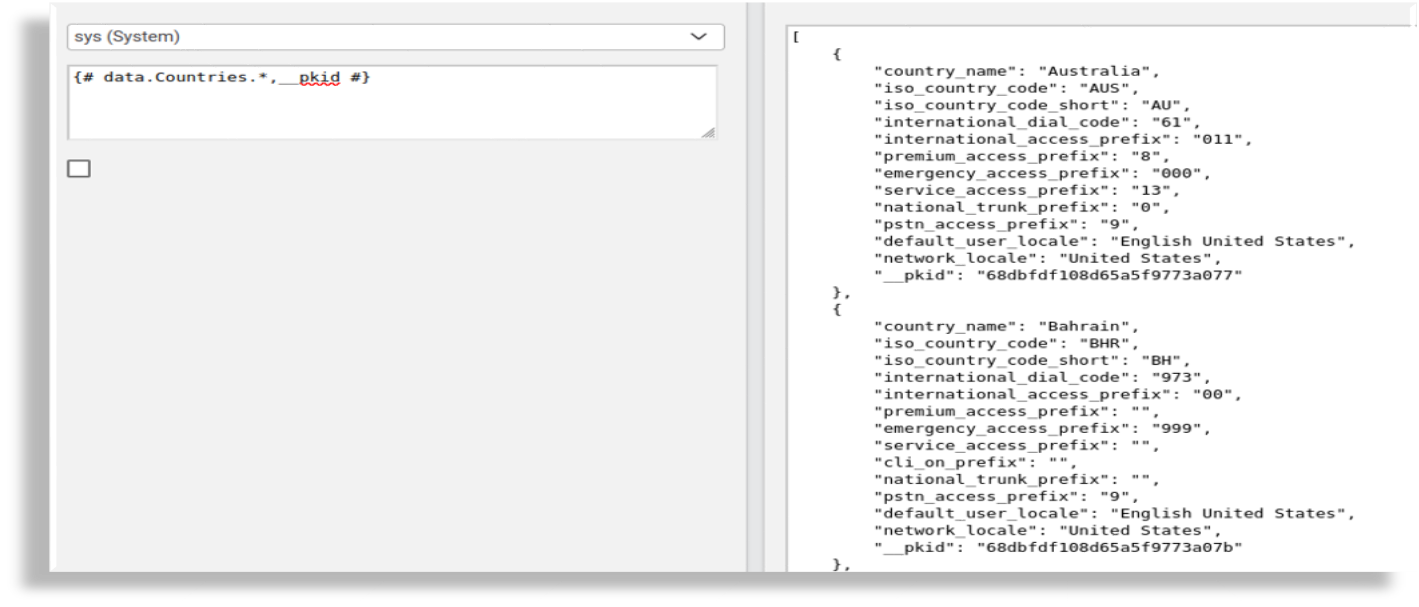
{# data.Countries.*,__pkid #}{# data.Countries.*,__pkid,__hierarchy_friendly_path,__hierarchy,__bkey #}
A unique ID is required for each instance when using a wildcard since it is not possible to rely on all fields to be unique. This is useful for overbuild workflows or any scenario requiring unique identification.
For example, macro {# data.Countries.*,__pkid #} returns all countries in the
database, plus the pkid. This syntax ensures that the macro output includes all fields and the unique
identifier for each instance.
{
     "country_name": "Australia",
     "iso_country_code": "AUS",
     "iso_country_code_short": "AU",
     "international_dial_code": "61",
     "international_access_prefix": "011",
     "premium_access_prefix": "8",
     "emergency_access_prefix": "000",
     "service_access_prefix": "13",
     "national_trunk_prefix": "0",
     "pstn_access_prefix": "9",
     "default_user_locale": "English United States",
     "network_locale": "United States",
     "__pkid": "63f7885cc33191b9204fa73e"
 },
Combining hierarchy fields
The hierarchy fields can be combined with model attribute names in a
comma separated list, for example:
{# data.Countries.country_name,__hierarchy,__hierarchy_friendly_path #}
Output snippet:
[
    {
        "country_name": "Australia",
        "__hierarchy": "58d303503f44d58341d61775",
        "__hierarchy_friendly_path": "hcs"
    },
    {
        "country_name": "Bahrain",
        "__hierarchy": "58d303503f44d58341d61775",
        "__hierarchy_friendly_path": "hcs"
    },

 ...
Note
Meta attribute properties can also be used in a macro filter. See Macro Syntax to Filter by Meta Properties.
Sequence and looping#
To indicate sequence instance with
SEQ- the value is a loop sequence number starting from 1 or a wizard step number:It is obtained from a Foreach List Macro in a provisioning workflow or a Foreach Elements loop in a configuration template.
This value can be used to refer to an attribute of a model. An array item in a configuration template has a Foreach Elements loop with a variable
phoneX:{# self.Phone.{{fn.subtract input.phoneX.SEQ,1}}.lines.line #}that refers to an attribute (line in a list of phones), starting with the first one:
self.Phone.0.lines.lineThis value can be used to refer to a Wizard step (stepSTEPNUMBER) in its configuration template. A Foreach Elements loop with a variable
stepthat holds a list of STEPNUMBER obtained from the wizard:{# input.define_wizard_steps #}so that stepSTEPNUMBER can be incremented with:
step{{cft.step.SEQ}}