
Digital Experience Monitoring (DEM) Agent Installation Architecture and Requirements#
Deployment Architecture#
VOSS Insights provides for the installation and configuration of Digital Experience Monitoring (DEM) Agents.
The VOSS Insights Forwarder is an agent that collects statistics such as latency and response times on various cloud endpoints, along with system CPU statistics, which is sent by means of the API back to the Arbitrator.
The purpose of the agents are to monitor network experience, in particular for Microsoft Graph API, Teams, Web login and Exchange.
Measuring and widgets are available to:
Measure hops
Measure latency
Measure web performance
Provide alarms on for example: too many hops, latency, bad response
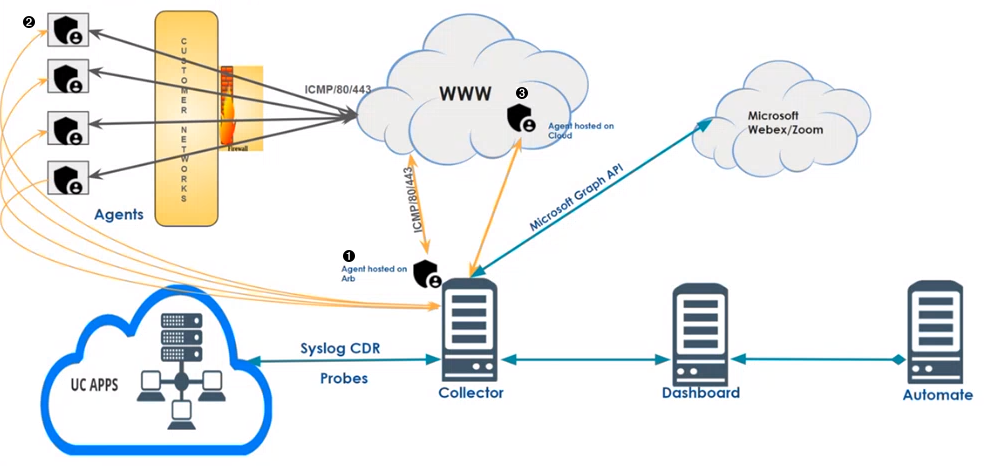
A number of installation deployment options are available:
 One agent built into a single Collector
 Multiple agents within a customer network
 Agent hosted in the cloud
Hardware/OS requirements#
The agent requires the deployment of a platform for it to run on - the agent itself is installed on that platform.
No specific hardware specification in terms of RAM, CPU, and so on is available: since this is a very lightweight agent, it can run on many hardware platforms.
However, some basic considerations are:
Location - you want the device to be as close to the end user environment as possible - e.g “on the floor” with the users, not part of the data center (DC) infrastructure. For instance, part of the office wifi if that is the primary means of connectivity, or cabled into the local LAN if that is the primary.
Connectivity - think of the different user connectivity options you want to test the experience over - LAN, wifi, guest wifi, etc.
Small form factors typically work best, for example Intel NUC, Raspberry Pi, an old laptop, and so on.
OS requirements are: Debian Linux OS. The agent installs via a Debian package install process.
The DEM agent does not currently support multiple network interfaces as part of the test suite - so if multiple interfaces are present, it will use the OS default routing. It is therefore currently best to just have a single network interface per device to ensure you know the interface being used.