Webex Licenses / License Inventory#
Overview#
Webex license usage counts are automatically updated in VOSS after licenses are assigned (that is, after assigning a subscriber with Webex services). A sync with the Webex Control Hub maintains the status of Webex user licenses.
Webex license sync#
Webex user license syncs may be executed manually:
Admin Portal |
To sync Webex users for the customer, go to Webex Organization, click on the customer, then on the overflow menu, select Sync Webex Teams Roles Licenses** Go to Cisco Webex Sync (SyncSpark filter) and run the |
Important
Webex licenses need to be synced after upgrading to release 21.1:
Execute the following data sync:
SyncSparkRolesLicenses<CUSTOMER_NAME>If the Webex organization associated with the Customer hierarchy has multiple subscriptions, a default subscription must be configured under the Webex Customer Access.
See Webex Application Access (Webex Organization) in the Core Feature Guide.
If the Webex organization associated with the Customer hierarchy has multiple Site URLs, a default Site URL must be configured under the Webex App Customer Access.
See Webex Application Access (Webex Organization) in the Core Feature Guide.
Only licenses synced and managed by VOSS will be assignable to a Webex user. This means that licenses from subscriptions and sites other than the default configured above will not be retained on a user.
Note
This process only collects data at customer and site levels.
Related topics
See Webex Application Access (Webex Organization) in the Core Feature Guide.
View Webex licenses#
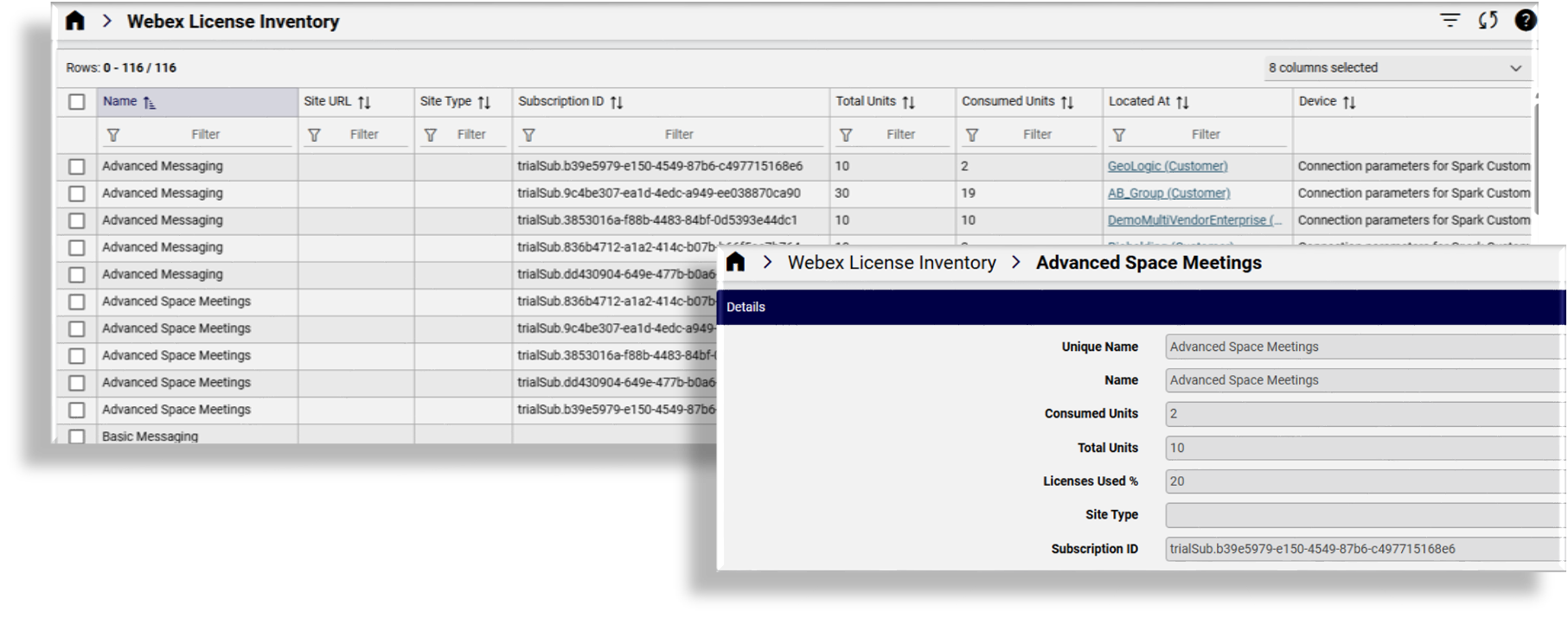
This procedure provides a condensed view of the Webex licenses consumed and available at the selected hierarchy level.
Go to the Webex Licenses or Webex License Inventory.
View Webex licenses in the list or click on a license to view these details:
Name (of the license)
Site URL (Webex hub)
Site Type (for example, Control Hub managed site)
Subscription ID (unique identifier for the license name)
Total Units (total number of licenses available)
Consumed Units (the number of licenses still available)
Location (where the licenses are available and used)
Device