
Welcome to Contact Center Management#
Contact Center Management
Overview#
Contact Center Management provides centralized, policy-driven management of Webex Contact Center agents and configuration, helping organizations onboard, manage, and scale contact center users efficiently.
This product is focused on agent lifecycle and configuration management, enabling administrators to provision, update, and decommission contact center agents quickly and consistently, without navigating multiple Webex portals or complex manual processes. By simplifying administration, Contact Center Management helps reduce operational overhead, minimize configuration errors, and address common challenges such as high agent churn and license sprawl.
Contact Center Management is part of the VOSS product automation and management suite and is designed specifically for Webex Contact Center deployments. It complements Webex Control Hub by adding structured workflows, role-based access, and API-driven automation that support both centralized and distributed contact center operations.
Scope
Contact Center Management:
Supports Webex Contact Center
Focuses on agent onboarding, offboarding, and configuration lifecycle management
Enables delegated administration and aligned role-based access for regional and business-unit contact centers
Integrates with external systems (such as ServiceNow or other ITSM platforms) through APIs to support automated provisioning workflows
Important
Contact Center Management does not replace contact center monitoring, analytics, or quality management solutions, and it does not manage legacy Cisco contact center platforms such as UCCX. These platforms are within the scope of UC Automation.
Use Contact Center Management when your priority is efficient, scalable, and controlled administration of Webex Contact Center agents, rather than real-time contact center monitoring or analytics.
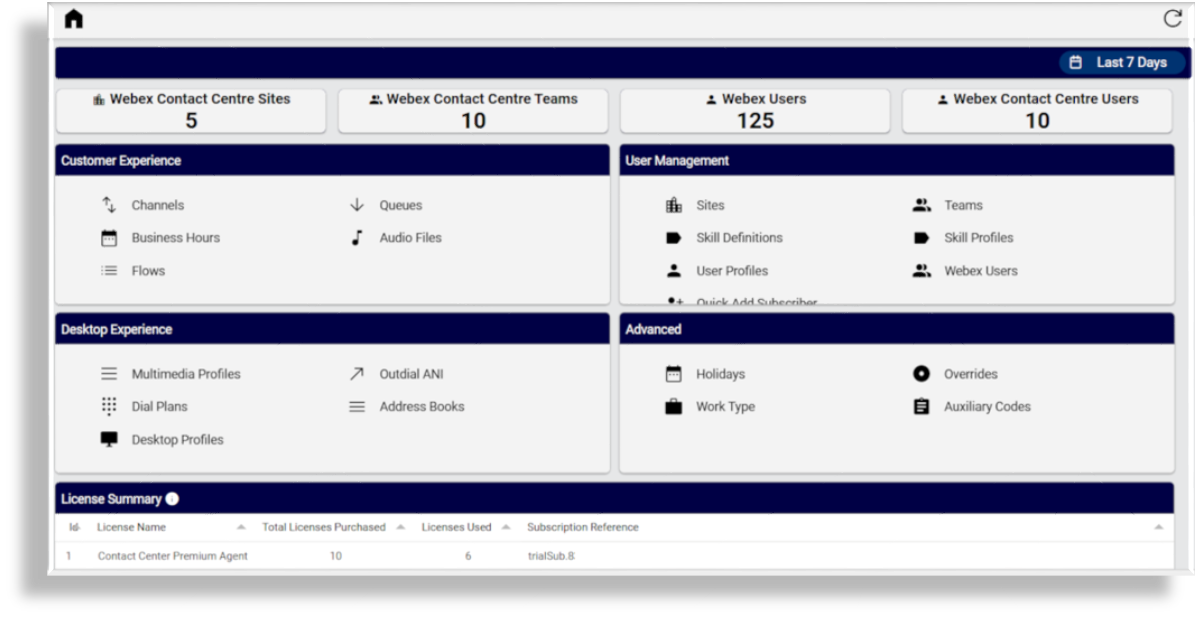
The image shows an example of the Contact Center Management dashboard, illustrating administrative visibility into Webex Contact Center agent and configuration data:
Related topics
How Contact Center is organized in VOSS#
For continuity and ease of use, the menu structure and terminology for Contact Center Management in VOSS closely follow the layout used in the Webex Control Hub. This allows administrators who are already familiar with Control Hub to navigate and manage contact center configuration with minimal retraining.
This approach reduces the need for administrators to switch between multiple Webex management portals and supports a more streamlined administrative desktop experience.
Administrators can view agent, license, and configuration data for Webex Contact Center alongside other UC services managed in VOSS, providing a centralized operational view across UC and contact center environments.
In addition to mirroring the Control Hub structure, VOSS introduces capabilities that support controlled administration at scale.
VOSS uses an internal business hierarchy to segment Webex Contact Center configuration data by region, site, or organizational unit. This makes it possible to:
Delegate administration to local teams or supervisors
Restrict visibility to only relevant users and configuration
Reduce reliance on global administrator access in the Webex Control Hub
Apply consistent role-based access control (RBAC) across UC and Contact Center domains
All access and configuration changes are governed by RBAC policies and recorded in transaction logs, supporting centralized oversight, auditability, and consistent operational control.
This administration model is suited to environments with high agent churn, multiple operational teams, or shared service ownership.
Agent Lifecycle Management#
Contact Center Management streamlines common agent lifecycle tasks, including:
Onboarding new agents with predefined profiles
Promoting existing Webex users to contact center agents
Updating agent configuration, skills, teams, and sites
Offboarding agents to release licenses promptly
Agent onboarding and changes can be performed individually, in bulk, or through automated workflows such as flow-through provisioning from identity sources or IT service management platforms. All configuration changes are logged, providing a complete transaction history for operational review.
Timely agent offboarding helps ensure unused contact center licenses are released and made available for reuse.
This lifecycle-focused approach is particularly effective in contact center environments with high agent churn, where rapid onboarding and prompt offboarding are essential to maintaining service continuity and avoiding unnecessary license consumption.
Automation, Integration, and Visibility#
Webex Contact Center management in VOSS supports:
Automation of repetitive administrative tasks, reducing manual effort and configuration errors
Bulk operations for agent and configuration changes at scale
Integration with external systems using APIs, including HR systems, ITSM platforms, and other business applications
Dashboards and summaries that provide visibility into agent capacity, license usage, and configuration status, with access controlled by role
The dashboards provide administrative and operational visibility only and are not intended for real-time contact center monitoring or customer analytics.
These capabilities help administrators respond more quickly to operational change while maintaining consistent governance.
Enabling Contact Center Management#
Contact Center Management must be enabled on the VOSS Platform before use:
Global Settings > Enabled Services > Enable Cisco Webex Contact Center
In the Webex Application Access settings, enable Contact Center Customer
Go to Webex Application Access (
relation/SparkCustomer) to enable Contact Center Customer for the connected Webex Organization; then also select the Contact Center Region on the form.
Webex Contact Center management becomes available in VOSS after the required platform and integration configuration has been completed.
Contact Center Management supports both enterprise and service-provider environments, including scenarios where multiple organizations or customers are managed from a single platform.
Once enabled, Automate provides tools to manage contact center agents and related configuration using the same operational model as other UC services, including hierarchy-based segmentation, role-based access control, automation, and audit tracking.
When Webex Contact Center is enabled, VOSS provides configuration and management capabilities for the following areas:
Agent and user management
Agents and users
Agent profiles
Teams
Sites
Skills and routing
Skills
Skill profiles
Customer experience configuration
Contact services
Queues
Entry points and overrides
These configurations support consistent routing and agent readiness, contributing to improved customer experience outcomes without providing direct customer interaction analytics.
Time and availability
Business hours
Holidays and overrides
Desktop and agent experience
Multimedia profiles
Address books
Auxiliary codes
Desktop and agent experience configuration in Contact Center Management relates to administrative configuration of profiles and supporting settings within Webex Contact Center. It does not modify or replace the live agent desktop interface used during customer interactions.
These features allow administrators to manage agent capacity, routing behavior, and agent experience from a single interface.