
Netflow monitored devices#
Netflow Management
For Netflow collection server setup steps, see: Netflow collection servers.
Once the Netflow Collector server has been added, add the devices that will be sending Netflow.
Note
Netflow monitored devices can also be added in bulk - refer to the Bulk Load topic in the System Functions section.
The Netflow Collector server (DS-9) has an internal firewall. Complete the following settings to open the firewall for the specified devices.
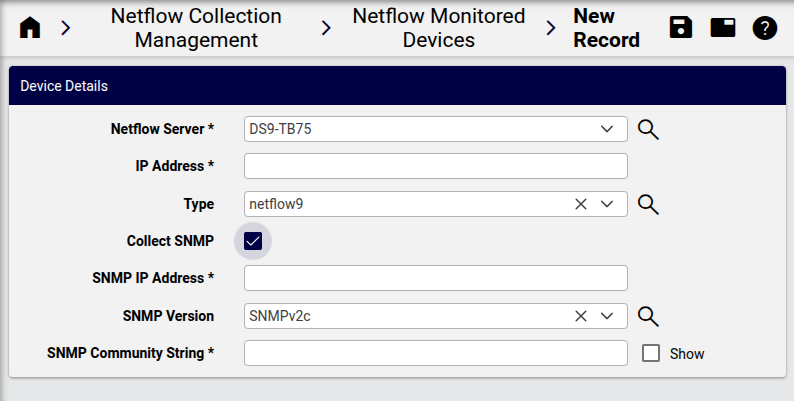

Device Details:
Netflow Server: select the configured server
IP Address: IP address of the device to receive flow data from.
Type: choices (Netflow 5,9,10)
Port: Type/Port combination defaults, e.g.: netflow5/9996
Collect SNMP: Yes/No
Select as applicable.
Yes: SNMP IP Address
Yes: SNMP Version: V1,2
For SNMP V3, add appropriate authentication details.
Yes: SNMP Community String: Enter community string for SNMP V1 or V2