
Access profile permissions and operations#
Overview#
Administrators at or above Provider level (for example, hcsadmin) can create and manage access
profiles as part of role management.
An access profile defines:
General permissions
Type-specific operations (for particular model types)
You can use wildcards in model references (e.g., data/*) when defining type-specific operations.
Note
If a type-specific permission conflicts with a general permission, type-specific rules override general permissions.
The default access profiles illustrate typical use cases; for example:
An Operator profile usually requires only Read access.
An Administrator profile at the same hierarchy might have Create, Update, and Delete permissions.
The following Provider-level administrator roles have full general and type-specific permissions across all models:
hcsadmin(Provider deployment)entadmin(Enterprise deployment)
Related topics
Permissions#
Permissions fall into these categories:
Miscellaneous permissions
Dashboard permissions (dashboard permission groups)
Type-specific permissions
Dependent permissions
Miscellaneous permissions#
These are general permissions. Many can be overridden via type-specific settings:
Permission |
Description |
|---|---|
Api Root |
Allows access to the API root endpoint. |
Copilot Chat |
Displays and enables the VOSS Wingman AI assistant. Requires the global setting Enable Copilot Chat enabled. Refer to the Settings and Tools section in the Advanced Configuration Guide. |
Device Type Root |
Allows access to the root endpoint for device type models.
For example, |
Export Data |
Granted to all users by default; allows export of search result data. |
Help |
Shows the online help button. |
Help Export |
Allows exporting of Help content. |
JSON Editor |
Enables editing model instances via the JSON Editor in the UI. |
Login |
Allows the user to login to the system. |
Meta Schema |
Default permission for all users; API endpoint providing access to model root endpoints. Used by the UI for populating itself with information about resources. Therefore, disable with extreme caution. |
Model Type Choices |
Default permission for all users; shows model type dropdowns and API model choices. |
Model Type Root |
Access to model root endpoints. For example,
|
Operations |
Allows operations to be run on models. |
Tag |
Allows tagging of search results. Removing the permission triggers a permission error. |
Tool Root |
Access to the API tool root endpoint
( |
Upload |
Allows users to upload files. |
Note
The following permissions allow for discovery of resources in API integrations:
Device Type Root
Model Type Root
Tool Root
Dashboard permissions (permission groups)#
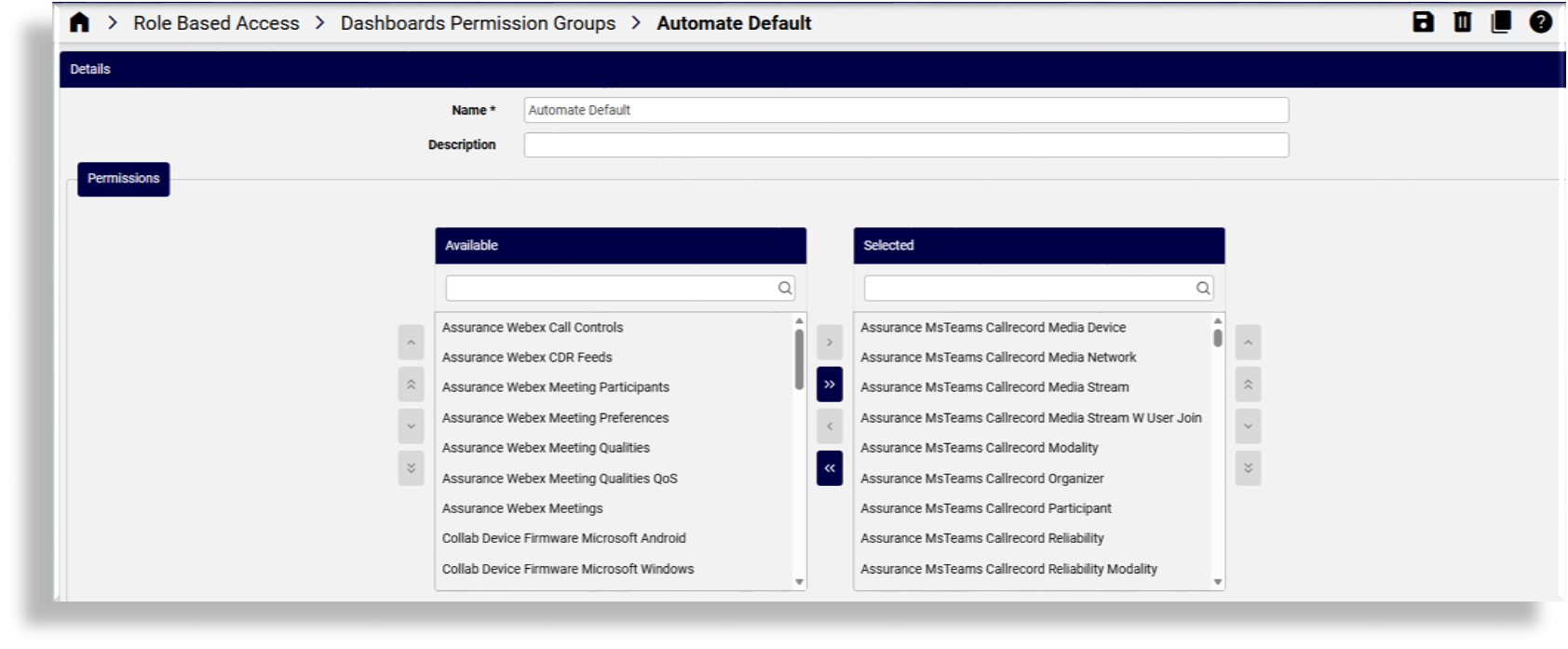
Dashboard permission groups group related Insights reporter resources (data/ReporterResource) that
dashboards require.
You can either:
Grant reporter resource permissions individually, or
Use a Dashboard Permission Group to simplify management
If a dashboard widget relies on a reporter resource that isn’t included in the user’s access profile:
The widget will not display its data
The user cannot manage the widget
Admins with inherited Provider-level access can create and delete dashboard permission groups.
A user’s dashboard permissions consist of both of the following:
Permissions selected in groups
Individually selected resources
Related topics
Type-specific permissions#
These are shown in the UI when viewing or listing a particular model’s type.
Note
Available permissions vary by model type. Enabling Create automatically enables Clone for that model type.
Examples of type-specific permissions
Permission |
Description |
|---|---|
|
Required for dashboards; granted to all users. |
|
Allows viewing About information. |
|
Allows viewing saved searches. |
|
Allows receiving alert notifications. |
|
Granted to all users by default. |
|
Default for all users. |
|
Allows exporting dashboard data (not the schema). |
|
Default for all users. |
|
Default for all users. |
Type-specific operations
Operation |
Description |
|---|---|
Create, Delete, Read, Update |
Standard model management operations. |
Configuration Template / Field Display Policy |
Allows creating templates and field policies. |
Export / Export Bulkload Template |
Enables export functionality. |
Bulk Update |
Allows bulk editing of selected list items. |
Purge |
For system administrators; removes the local database instance while retaining it on the device. Relevant only where the UC server is online and available in the VOSS system. |
Migration |
For designers; allows generating migration templates. |
Tag / Tag Version |
For designers; allows tagging model instances. |
Dependent permissions#
Some API endpoints grant permissions through higher-level operations, and may be granted by having another permission in the access profile.
Example:
Permission to
/api/handle_oauth_webex/Granted automatically if the user has Update permission on
relation/SparkCustomer
Related topics