
Replace Webex device#
Overview#
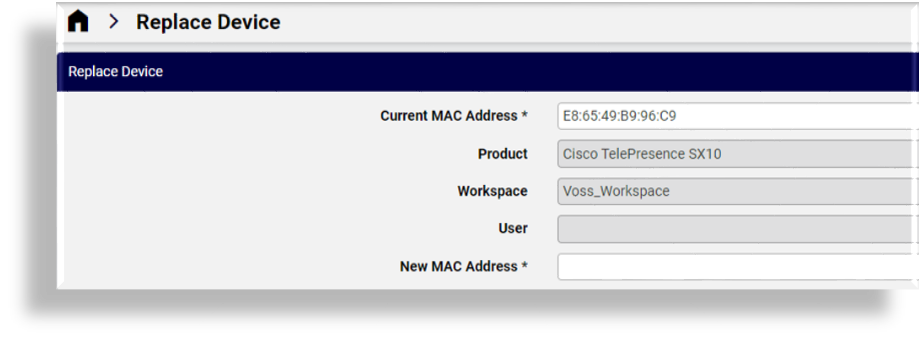
On the Replace Device page you assign a new MAC address to an existing Cisco Webex ATA, MPP, or Wi-Fi device, and copy the full device configuration of the existing device (including user or workspace assignment) to a replacement device.
This allows you to replace a faulty or failed device without manually reconfiguring all settings on the replacement device.
Select the current MAC address to auto-populate the form, then fill out the new MAC address, and save.
When replacing a Webex device, all configured lines on the original device are preserved and applied to the replacement device, provided the replacement device model supports the same number of line ports or line key assignments.
For devices using dynamic configuration, line assignments are still preserved during replacement. While some device-specific fields may be recalculated or managed by the system, line assignments and their port positions are preserved.
Related Topics
Multi-line device replacement#
When replacing a Webex device, all configured lines on the original device are preserved and applied to the replacement device.
Each line is mapped to a specific port on the device:
Port 1 remains the primary line
Additional lines are preserved on their respective ports
Line assignment continues to follow port order, where the primary line is assigned to port 1 and additional lines retain their positions (for example, port 2, port 3) on the replacement device.
This ensures that all line assignments and call appearances remain unchanged after the replacement.
Note
Multi-line preservation depends on the capabilities of the device model. Only devices that support multiple line ports or line keys will retain multiple lines during replacement.
Device configuration behavior during replacement#
During device replacement, the full device configuration is copied from the original device and applied to the replacement device.
This includes:
All configured lines
The associated user or workspace
Assigned numbers or extensions
Device-specific configuration settings
Line behavior is preserved based on port assignments.
Replacement lifecycle handling#
During device replacement, the existing Webex device is removed first to free workspace capacity and avoid Webex device-limit errors. The replacement device is then added, and the configuration from the original device is applied to it. If the replacement device cannot be added successfully, the user or workspace may temporarily have no device until the issue is resolved.