
Tools#
Overview#
The SNMP Tools page allows you to load or import MIBs and then build SNMP actions/ scripts to be saved as probes within the platform.
Insights ships with a library of MIBs that can be opened by choosing the Load MIB button. If a new one is needed it can be imported by selecting the Import MIBs button.
Load a MIB#
On the Tools page, click Load MIB.
In the Select a MIB dialog, view the choice of all the manufacturer MIBs available in the system, then select the relevant MIB.
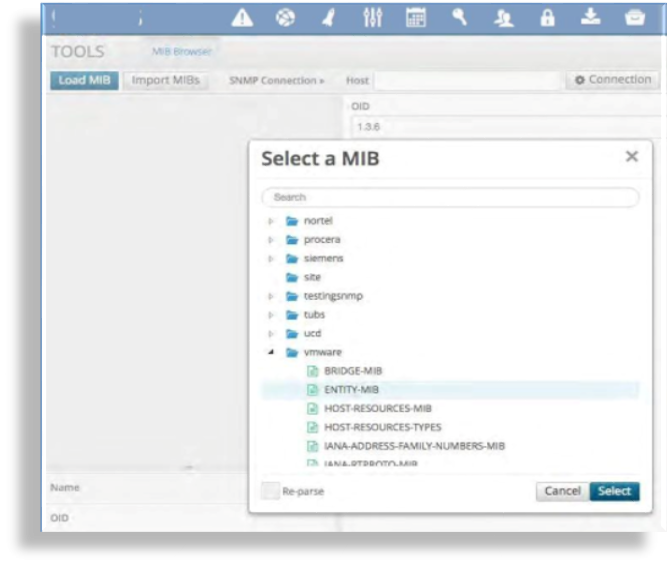
Once the MIP is selected you can open up all of the branches and leaves and view each associated OID.
Choose the folder you wish to use, and fill out the connection settings for that system.
Click Connection, fill out the host name or IP and choose the SNMP version.
If selecting V3 then a set of different parameters will pop up and you will need to fill these in.
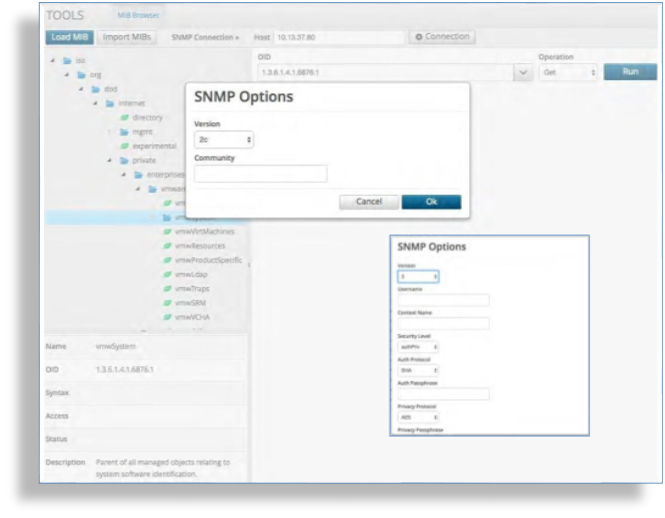
Choose the operation to perform: GET, GET NEXT, or WALK
The operation returns values of the OID you query in the field below it.
Selecting any of the checkboxes adjacent to the field enables Create Probe.
Repeat for each probe you want to add.
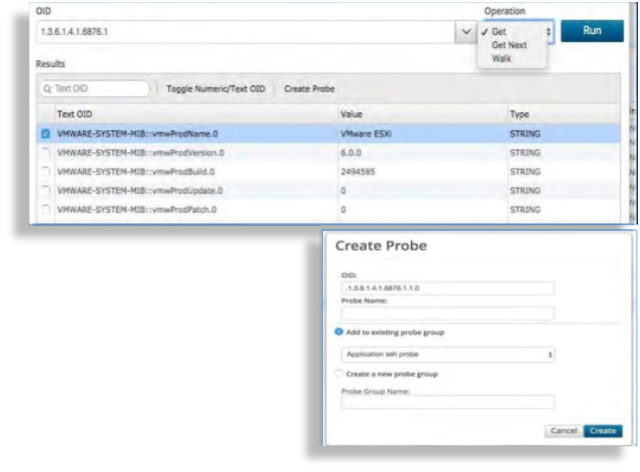
Click Create Probe. A dialog displays, allowing you to fill out a name for the probe, and either save the probe to a new or existing probe group.
Now you have a new probe that will run the particular SNMP command you requested.