Configure Cisco UCM for AutoRegistration and PBR#
Overview#
This section describes phone-based registration (PBR) setup.
Related Topics
The flowchart provides the steps for this task:
Using PBR setup to configure a UCM#
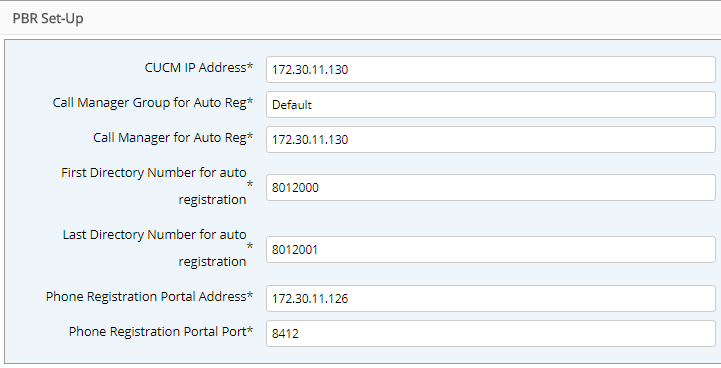
Use the PBR Setup menu to automates the configuration of Cisco Unified Communications Manager (UCM) for AutoRegistration and Phone Based Registration.
In the Automate Admin portal, go to PBR Setup.
Configure the following:
Setting |
Description |
|---|---|
CUCM IP Address |
IP Address of the publisher for the UCM cluster. |
Call Manager Group for Auto Reg |
Name of UCM group for AutoReg. |
Call Manager for Auto Reg |
Name of the Call Manager for AutoReg (as specified under CUCM Call Managers). |
First and Last Directory Number for Autoreg |
A valid range of DNs to be used for Auto Registration. |
PBR Portal Address |
The IP Address of Automate cluster UN1 |
PBR Portal Port |
8412 |
It is recommended that initial configuration of the UCM is performed using the PBR setup workflow described above. In cases where there is existing auto-registration config on the UCM, it may be required to do this manually.
Important
Set the Services Provisioning value (under Enterprise Parameters Configuration - Parameter Name on the associated UCM) to Both.
Configuration on Cisco UCM#
Automate Phone Based Registration (PBR) requires the following functionality to be configured on UCMs that manage phones which may be registered by this feature:
Configure the UCM to allow AutoRegistration of new phones.
This is standard auto registration config for UCM. The PBR Setup in Automate carries out this configuration.
When a phone Auto Registers the
phoneregphone service should be configured for the phone. This is achieved by specifying a Universal Device Template for Auto Reg that user to thephoneregphone service.
Screenshots of the relevant configuration on UCM are provided to assist with understanding how the service is implemented and as background for a Cisco expert that may need to fine tune the Unified CM config.
Setup the
phoneregPhone Service:Browse to Device > Device Settings > Phone Services.
172.30.11.126
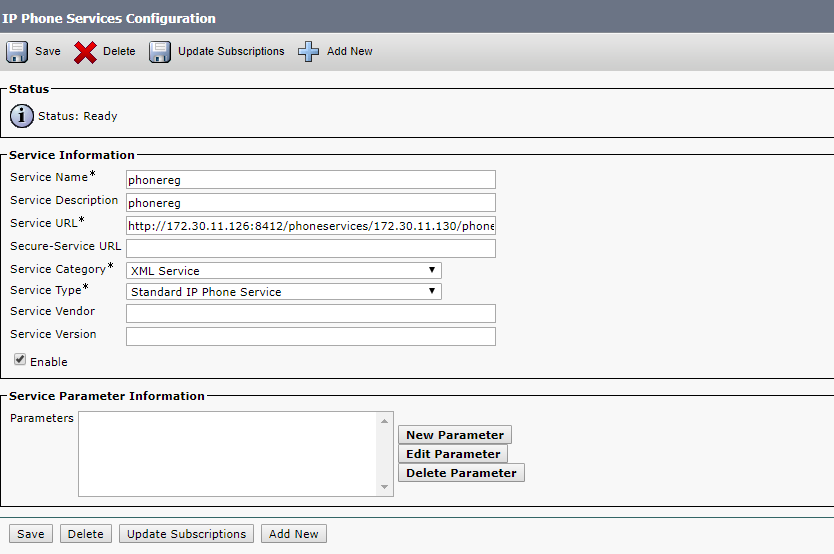
Service URL:
Depending on whether HTTPS or HTTP is used the service URL may be different:
HTTP (Service URL):
http://{VOSS_IP}:{PBR_PORT}/phoneservices/{UnifiedCM_IP}/phonereg/menu?device=#DEVICENAME#HTTPS (Secure-Service URL):
https://{VOSS_IP}:443/phoneservices/{UnifiedCM_IP}/phonereg/menu?device=#DEVICENAME#For HTTPS-only, both Secure Services URL and Service URL must be populated with the HTTPS URL.
Note
The port must always be specified explicitly.
Configure
phoneregUniversal Device Template:Browse to User Management > User/Phone Add > Universal Device Template.
Note the subscription to the
phoneregPhone Service.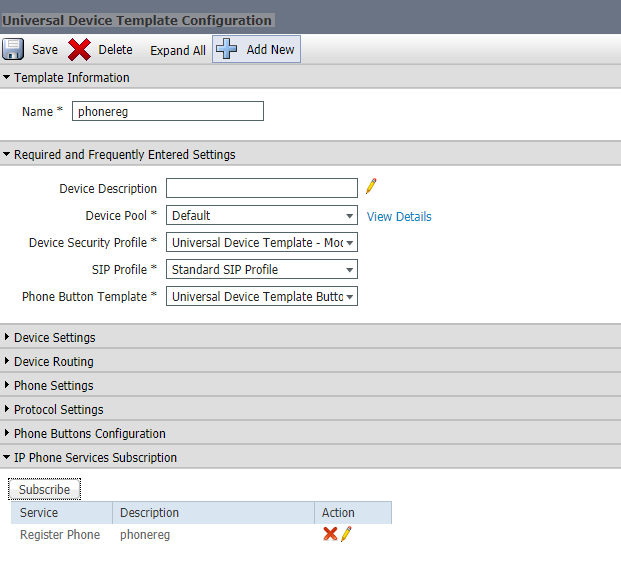
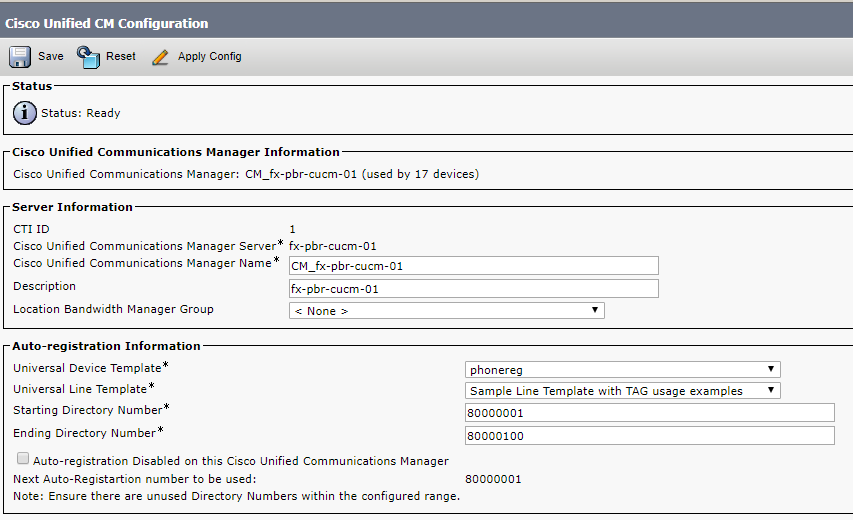
UCM for Auto Registration:
Browse to System > Cisco Unified CM.
Note the
phoneregUniversal device template.