
/v2/login#
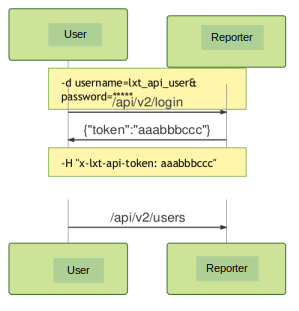
The login route is required before access to any route under v2 is
requested. The system will respond with a token that needs to be included
in the header of all subsequent API requests.
The following methods are supported for the login route.
Method |
URI |
Description |
|---|---|---|
POST |
|
Retrieves dashboard data for a specific user. |
High Level login API Flow#
POST#
/v2/login
Required Parameters
The login request requires a
usernameandpasswordparameter to be sent as part of the POST request.Note
The
usernameandpasswordshould be sent as a multipart form parameter. The username should be a userid that already exists in the system. A user can be added through our User Interface or via the API.By default, the system contains a user named
lxt_api_user. Thisuseridcan be used for first time API users. Thelxt_api_userpasswordis set at install time by your system administrator.Example Curl Request
Command:
curl-k -w'\nRESP_CODE: %{response_code}\n'
    -X POST https://<IP or FQDN>/api/v2/login
    -d"username=lxt_api_user&password=password1"
Output:
{"token":"eyJ0eXAiOiJKV1QiLCJhbGciOiJSUzI1NiJ9[...]"}
RESP_CODE:
200
All subsequent API requests#
Ensure every API request to the endpoints under /v2 includes this token
in the x-lxt-api-token header for authentication.
Example Curl Request (where
some_endpointis your endpoint)Command:
curl -k -X GET https://<IP or FQDN>/api/v2/some_endpoint \
-H "x-lxt-api-token: eyJ0eXAiOiJKV1QiLCJhbGciOiJSUzI1NiJ9[...]"