
SSL Ciphers#
Supported SSL Ciphers#
This topic lists the SSL ciphers that Insights can support:
Note
The OpenSSL software package defines the ciphers Insights (and all Linux distributions) can use. This list may change as ciphers are added or found to be insecure. The Apache application can be configured to use a subset of the base supported ciphers - cipher support can be customized depending on your security requirements.
AES256-GCM-SHA384
AES128-GCM-SHA256
AES256-SHA256
AES128-GCM-SHA256
AES256-SHA
AES128-GCM-SHA256
DHE-PSK-CHACHA20-POLY1305
DHE-PSK-AES256-GCM-SHA384
DHE-PSK-AES128-GCM-SHA256
DHE-RSA-CHACHA20-POLY1305
DHE-RSA-AES256-GCM-SHA384
DHE-RSA-AES128-GCM-SHA256
DHE-RSA-AES256-SHA256
DHE-RSA-AES128-SHA256
DHE-PSK-AES256-CBC-SHA384
DHE-PSK-AES256-CBC-SHA
DHE-PSK-AES128-CBC-SHA256
DHE-PSK-AES128-CBC-SHA
DHE-RSA-AES256-SHA
DHE-RSA-AES128-SHA
ECDHE-PSK-CHACHA20-POLY1305
ECDHE-RSA-CHACHA20-POLY1305
ECDHE-RSA-AES256-GCM-SHA384
ECDHE-RSA-AES128-GCM-SHA256
ECDHE-RSA-AES256-SHA384
ECDHE-RSA-AES128-SHA256
ECDHE-ECDSA-CHACHA20-POLY1305
ECDHE-ECDSA-AES256-GCM-SHA384
ECDHE-ECDSA-AES128-GCM-SHA256
ECDHE-ECDSA-AES256-SHA384
ECDHE-ECDSA-AES128-SHA256
ECDHE-PSK-AES256-CBC-SHA384
ECDHE-PSK-AES256-CBC-SHA
ECDHE-PSK-AES128-CBC-SHA256
ECDHE-PSK-AES128-CBC-SHA
ECDHE-RSA-AES256-SHA
ECDHE-RSA-AES128-SHA
ECDHE-ECDSA-AES256-SHA
ECDHE-ECDSA-AES128-SHA
PSK-CHACHA20-POLY1305
PSK-AES256-GCM-SHA384
PSK-AES128-GCM-SHA256
PSK-AES256-CBC-SHA384
PSK-AES256-CBC-SHA
PSK-AES128-CBC-SHA256
PSK-AES128-CBC-SHA
RSA-PSK-CHACHA20-POLY1305
RSA-PSK-AES256-GCM-SHA384
RSA-PSK-AES128-GCM-SHA256
RSA-PSK-AES256-CBC-SHA384
RSA-PSK-AES256-CBC-SHA
RSA-PSK-AES128-CBC-SHA256
RSA-PSK-AES128-CBC-SHA
SRP-AES-256-CBC-SHA
SRP-AES-128-CBC-SHA
SRP-RSA-AES-256-CBC-SHA
SRP-RSA-AES-128-CBC-SHA
TLS_CHACHA20_POLY1305_SHA256
TLS_AES_256_GCM_SHA384
TLS_AES_128_GCM_SHA256
Enable/Disable TLSv1.2#
Starting with Insights 25.1, TLSv1.2 is disabled by default as the Tenable web application scan flags a number of SSL/TLS ciphers as unsupported due to a medium risk security vulnerability. Disabling TLSv1.2 on Insights disables cipher suites without forward secrecy and retains only cipher suites that provide forward secrecy (ECDHE or DHE based cipher suites).
When TLSv1.2 is disabled, only TLSv1.3 ciphers are present.
Note
This issue is relevant for all Insights products - Arbitrator, Dashboard, DS9.
Ciphers offering forward secrecy (FS), also known as perfect forward secrecy (PFS), provide assurances the session keys won’t be compromised even if the server’s private key is compromised.
If you wish to enable TLSv1.2:
Log in on Insights CLI to the Administration menu.
Select Apache TLS Config.
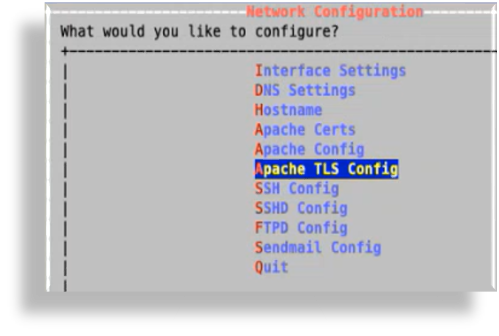
On the Apache TLS settings screen, view the current status of TLSv1.2 (enabled or disabled).
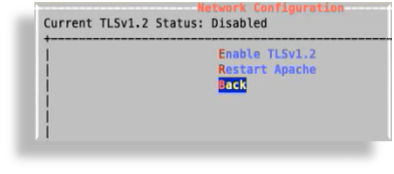
To enable TLSv1.2, select Enable TLSv1.2, then click OK.
Enabling TLSv1.2 allows Insights to support additional ciphers.
Apache restarts automatically any time you enable or disable TLSv1.2. If you want to restart Apache manually, you can select Restart Apache on the TLSv1.2 configuration screen, or on the main Network Configuration screen.