
Multi-cluster or single cluster configurations#
Overview#
Previously, IM and Presence Service (previously known as CUP) was set up in a cluster separate from the Cisco Unified Communications Manager (UCM) cluster, in a configuration known as multi-cluster.
However, the IM and Presence Service servers are set up as part of the UCM cluster itself, in what is called a single-cluster configuration.
Advantages of a single-cluster configuration#
A single cluster configuration is recommended, and service providers are encouraged to use this configuration for any new clusters.
Single-cluster configurations have the following advantages:
Correctly represents the UCM cluster with its IM and Presence Service servers in the management layer
Eliminates the confusion that multi-cluster configurations can cause for administrators when these servers are shown in different clusters.
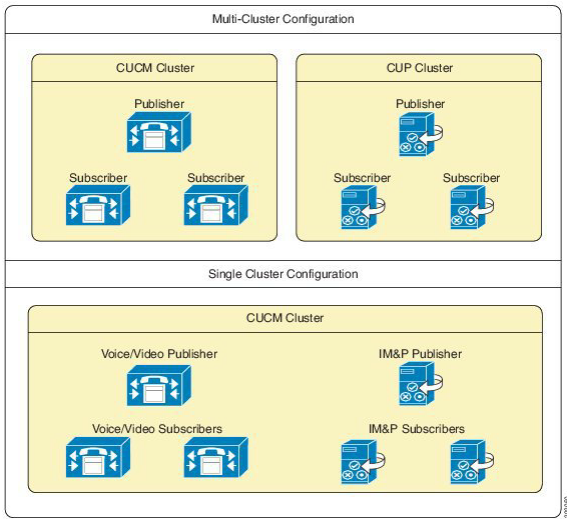
Deprecation of multi-cluster configurations#
Multi-cluster configurations are deprecated and strongly discouraged. However, Automate continues to support multi-cluster configurations for backward compatibility and upgrades.
Convert a multi-cluster configuration to single cluster#
This procedure migrates your CUP (also known as IM and Presence Service) nodes to a UCM cluster (single- cluster configuration - the recommended option).
Migrating CUP nodes to a UCM cluster is hierarchy-specific:
A Customer CUP node can only be migrated to a Customer UCM cluster (not to a Provider or Reseller cluster)
A Publisher IM_P node is added first, then Subscriber nodes.
Conditions that apply when migrating your CUP to a UCM cluster:
Cluster versions must be the same for both the clusters
The IPv4 address or hostname and domain configuration must not be duplicated within the cluster
Two devices cannot have the same server name
No more than one CUP publisher can be migrated to the same UCM cluster
Multiple users can be migrated to the same UCM cluster
To convert existing multi-cluster configurations to single-cluster configuration:
Log in as Provider, Reseller, or Customer administrator, depending on the hierarchy level where the CUP cluster was configured.
Set the hierarchy path to the hierarchy node where the CUP cluster was configured. Choose an option:
Shared configuration? Set the hierarchy to Provider or Reseller node.
Dedicated configuration? Set the hierarchy to a Customer node.
Go to (CUP - deprecated) Migrate CUP to CUCM Cluster.
At From CUP Cluster, select the CUP cluster you wish to migrate.
At To CUCM Cluster, select the UCM cluster to which you want to migrate the CUP cluster.
Click Save.
The migrated CUP server is removed from the (CUP) Servers list, and displays instead on the (UCM) Servers list as server type, IM_P.
The cluster name for the migrated servers is now the same as the UCM cluster name.