
Quick add user provisioning workflow structure#
The Quick Add User functionality uses a view model to define its schema that also ultimately defines:
The form fields a user sees in the GUI
The column headings in the Quick Add User bulk loader sheet
The attributes supported by the API endpoint (
view/QuickSubscriber)
This view schema represents a simplified version of all possible
user fields.
Associated with the view is a Provisioning Workflow (PWF) called
AddQuickSubscriber, which captures these simplified fields and
combines or maps them into the various components (services) of a
full user. The main purpose of this workflow is to execute
an “Add relation/Subscriber” operation.
The “Add relation/Subscriber” operation in turn executes a second
PWF called AddSubscriberNew, which separates
out the data for each user component or service and executes
an “Add” operation on the corresponding device models, for example
on device/cucm/Phone.
It is inside this AddSubscriberNew workflow that the configuration templates
of the selected Quick Add Group is evaluated.
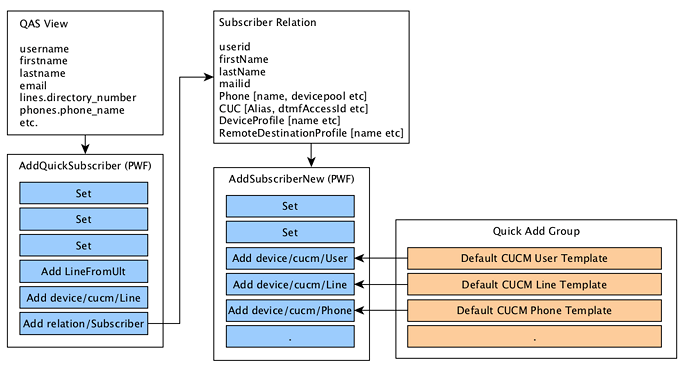
Since the Quick Add Group configuration templates (CFTs) are evaluated inside
the AddSubscriberNew workflow, it is important that the user relation field names not
be those of the Quick Add User view. Generally, all field values
are made available to an executing PWF and is referred to as the context.
For example, refer to the diagram and notice the difference in field (attribute)
naming between the Quick Add User view and the user relation schemas, for
example username as opposed to userid. The difference is subtle,
but very important: the user name in the Quick Add User workflow context
(AddQuickSubscriber) is username, but in the user relation workflow context
(AddSubscriberNew) it is userid.