
CLI Commands#
Enter help (or health) to display the following screen::
System information as of Mon Mar 31 11:30:20 AM UTC 2025

 System load:  1.93               Processes:               453
 Usage of /:   52.5% of 19.20GB   Users logged in:         2
 Memory usage: 25%                IPv4 address for ens160: 192.168.100.3
 Swap usage:   0%
 You have mail.
 Last login: Mon Mar 31 11:30:21 UTC 2025 from 172.29.93.50 on pts/2

 host: VOSS, role: webproxy,application,database
 date: 2025-03-31 11:32:53 +00:00, up: 3:59
 network: 192.168.100.3/27, ntp: 172.29.1.11
 WARNING: TRANSACTION DATABASE MAINTENANCE NOT SCHEDULED - SETUP SCHEDULE FOR REGULAR MAINTENANCE
 WARNING: CURRENT LICENSE FOR 67ea4f0656ad41abb24a7b22 (Automate) IS SET TO EXPIRE ON 2025-04-07


         user - manage users                  database - database management
         diag - system diagnostic tools         drives - manage disk drives
         mail - local mail management          network - network management
          app - manage applications                log - manage system logs
       system - system administration          cluster - cluster management
       backup - manage backups                insights - insights management
          web - web server management             keys - ssh/sftp credentials
       notify - notifications control             voss - voss management tools
  selfservice - selfservice management        schedule - scheduling commands
         snmp - snmp configuration             license - license management
Note
From release 21.1 onwards, cluster commands should be used in standalone (“cluster-of-one”) deployments.
On web proxy nodes, the only cluster command you can run is cluster prepnode. Database commands are also not available on web proxy nodes.
Notices and critical warnings are shown in colors upon login.
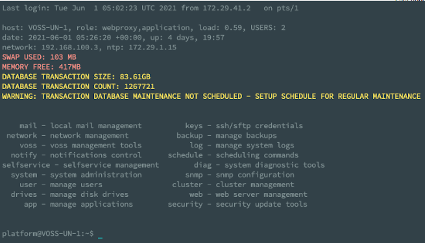
This includes system license errors and warnings, for example:
WARNING: CURRENT LICENSE FOR <platform ID> IS SET TO EXPIRE ON <date>
For more details, refer to Login Report.
Entering any valid command name displays the usage parameters of that command. The system command help display is shown below::
platform@development:~$ system
USAGE:
------
system date                - Display the system date and time
system download <url>      - Download a specific URL to media directory
system history             - Display a history of all executed UI commands
system keyboard <kbd-type> - Change the keyboard type (e.g. dvorak, us)
system mount               - Mount all removable media
system password            - Change the platform password
system provision           - Provision all the applications
system reboot              - Reboot the system
system root                - Support administration via one-time-password
system shutdown            - Halt the system
system unmount             - Unmount all removable media
When commands are run on a cluster, a number of options are available to specify the nodes on which the commands can be run. In other words, there is a <where> clause: cluster run <where>. The clause can take:
role - the role of the node:
application,database,webproxyall- the entire clusternotme- all nodes except the one the command is run on
For example, cluster run notme system shutdown would issue the command to shut down all nodes except the one the command is run on.
Note
In a cluster, reboot and shutdown of the entire cluster should be done on each node and not with the cluster run all command - see: Remote Execution in Clusters.
Tab completion is available from the CLI for commands, parameters and partial filenames, for example:
$ log <Tab>
audit      collect    follow     list       merge      purge      send       sendnewer  view

$ log audit <Tab>
locallog   remotelog  ssl        status

$ log view process/ngin <Tab>
$ log view process/nginx.proxy.log
See also Using the screen command.