
User provisioning use cases#
The image is a diagram describing two typical user provisioning use cases:
Top-down
Bottom-up
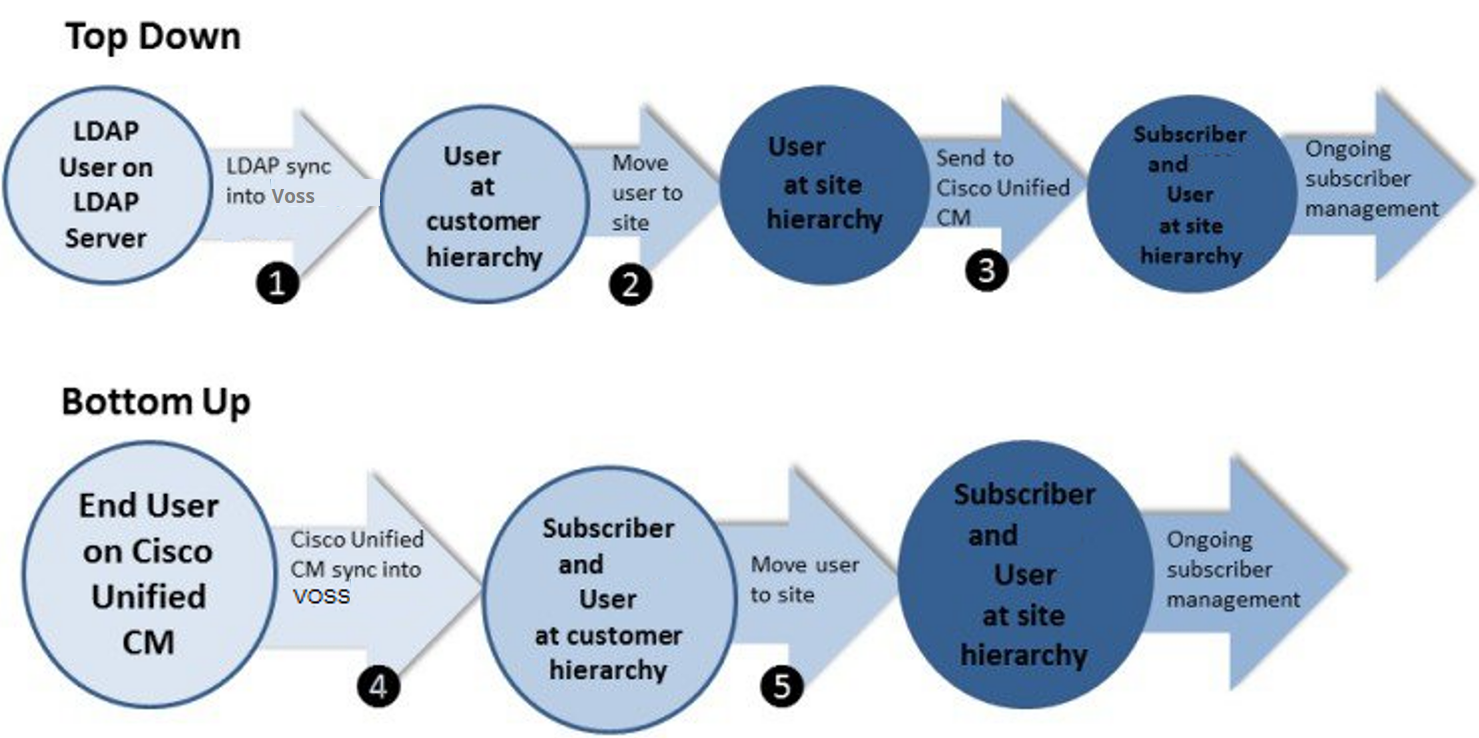
Use the following menus in VOSS Automate to perform the operations shown in the preceding figure:
User Management > Sync & Purge > LDAP Users
User Management > Move Users
Performed by any of the following:
User Management > Users
Subscriber Management > Subscribers
Subscriber Management > Quick Add Subscriber
User Management > Sync & Purge > CUCM Users, Lines, Phones
User Management > Move Users
In each diagram:
The user starts on an external server, either LDAP (for example, Open LDAP or Active Directory), or on Cisco Unified Communications Manager (CUCM).
When the user is synced into Automate, either an Automate user is created, or both an Automate user and subscriber are created.
For each step, the diagram also shows the hierarchy node where the user exists. The result in both cases is that both a subscriber and an Automate user exist. From that point, the user is primarily managed via Automate’s Subscriber Management GUI.