Navigation

  • index
  • next    
  • previous    
  • VOSS-4-UC 21.1 documentation »
  • Business Admin Portal Guide »

Navigate Organizations

Organization (or hierarchy) levels define where you want to view or change data in the system, for example, at either system level, or provider, reseller, customer, sites, or intermediate nodes.

For most tasks, you’ll need to select the appropriate organization level before you start.

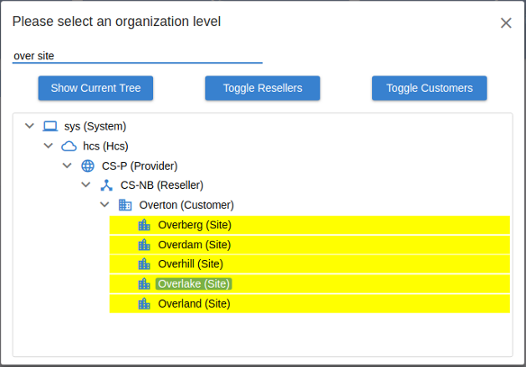
  • To choose an organization level, click the Organization Selection button new-bap-organization-selection on the top menu bar to open the Organization Selection widget.

    The widget displays an organization tree, along with search, filter, and view options.
    new-bap-hierarchy-selection-widget

  • To show or hide elements in the tree, click the relevant Expand / Collapse icons (> / v).

  • To search the tree, enter criteria in the filter field above the tree. Criteria may include organization labels, and phrases such as “contains”, and “AND”.

    Filter results are highlighted in the tree.

  • To expand or collapse the tree at resellers or customers, click Toggle Resellers or Toggle Customers.

  • To show the entire tree, click Show Entire Tree.

    Note

    When a node in the tree organization is selected and highlighted, nodes on the same level are hidden. Clicking Show Entire Tree expands the entire tree, showing any hidden branches.

Logo

Quick search

Contents

  • What’s New by Feature
  • What’s New by Document
  • Compatibility Matrix
  • Provider Core Feature Guide
  • Enterprise Core Feature Guide
  • Self-service Guide
  • Architecture and Hardware Specification Guide
  • Installation Guide
  • Upgrade Guide with ISO and Template
  • Multi-Cluster Deployments Technical Guide
  • Platform Guide
  • Health Checks for Cluster Installations Guide
  • Best Practices Guide
  • Advanced Configuration Guide
  • BulkLoader Provisioning Guide
  • Provider HCS Dial Plan Management Support Guide
  • Business Admin Portal Guide
    • What’s New
    • Introduction to the Business Administration Portal
    • Assign a Business Admin Portal Profile to a Role
    • Log In
    • Working in the Business Admin Portal
      • Search
      • Organizations
        • Navigate Organizations
        • Modify Site Defaults
      • Subscribers
      • Transactions
      • Unified Messaging
      • Contact Center
      • Bulk Load
    • Business Admin Portal User Interface
  • Licensing and Subscriber Data Export Guide
  • API Guide
  • Language Pack Guide
  • Microsoft Windows PowerShell Proxy Server Installation and Upgrade Guide (Microsoft Teams)
  • NBI Technical Description and Deployment Guide
  • NBI Install Guide
  • Open Source License Usage

Previous topic

← <no title>

Next topic

→ Manage Services

This Page

  • Show Source

Navigation

  • index
  • next    
  • previous    
  • VOSS-4-UC 21.1 documentation »
  • Business Admin Portal Guide »
Email us. We appreciate and value your comments.              © Copyright 2021, VISIONOSS LIMITED. Last updated on 02 Sep 2021 at 14:12.