Navigation

  • next
  • previous    
  • VAA documentation »
  • Dashboard and Reporting Administration Guide »

Print Dashboard

Click the Options drop-down and select the Print Dashboard option. A print dialog box will pop up allowing you to customize the title. Enter the title you want, and then check the Place descriptions below legend check box. This will place all description text in the Widgets below the charts. Then select the design by choosing the number of widgets to place on a page. Once complete upload a logo and print the report.
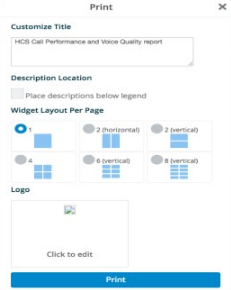

analytics-print-widget

Logo

Quick search

Previous topic

← Add Widget to a Dashboard

Next topic

→ Position Widgets

This Page

  • Show Source

Navigation

  • next
  • previous    
  • VAA documentation »
  • Dashboard and Reporting Administration Guide »
Email us. We appreciate and value your comments.              © Copyright 2021, VISIONOSS LIMITED. Last updated on 01 Jul 2021 at 21:57.